
Texels, Pixels and the Zoom: Sampling and Mipmaps for 2D Sprites
Every sprite in Iron Sector is stored at one size and drawn at another, and each time the graphics card has to decide what colour a screen pixel gets. This lesson follows that decision through filters, zoom steps, mipmaps and two whole sprite sets, with the game's real numbers.
- zoom steps, and no others
- 0.5 · 1 · 2zoom steps, and no others
- memory for a mipmap chain
- +⅓memory for a mipmap chain
- texels per unit in the HD set, twice the SD 3.75
- 7.5texels per unit in the HD set, twice the SD 3.75
- texture memory gate per mission in HD
- 512 MBtexture memory gate per mission in HD
A texel is not a pixel
A stored picture is made of texels, the cells of the texture. The screen is made of pixels. When a sprite is drawn at exactly its own size, every texel lands on one pixel and there is nothing to decide. At any other size the two grids no longer line up: one screen pixel may cover half a texel, or two and a half, and the graphics card has to choose a colour for it.
That choice is called sampling, and it is where crisp pixel art turns to mush, or smooth art turns into a staircase. Iron Sector draws thousands of sprites at three zoom levels on screens of two different densities, and no single answer is right for all of them. So the game keeps two whole sets of sprites and switches between them.
Nearest and bilinear
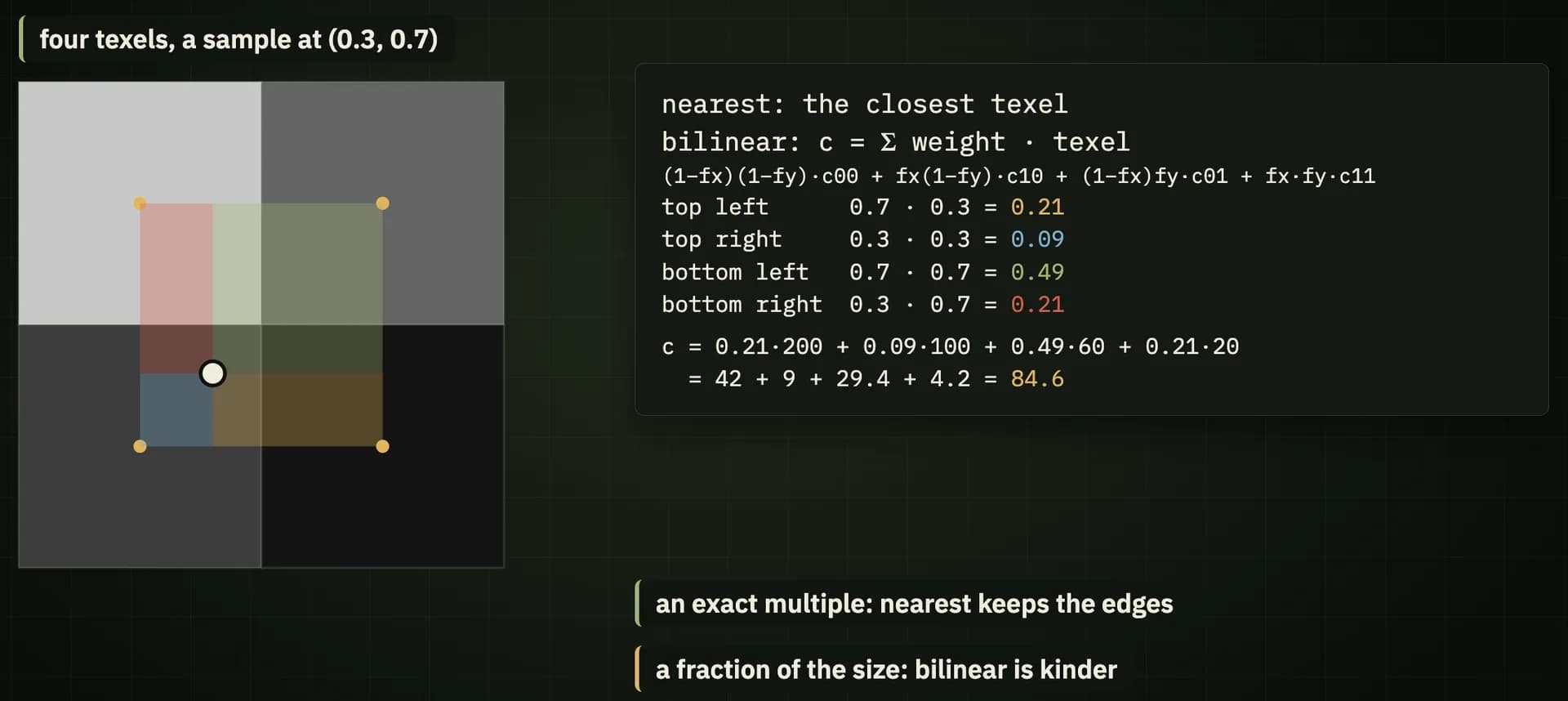
Graphics cards have two sampling modes built in. Nearest sampling takes the texel closest to the requested point and returns its colour unchanged, so the edges of the picture stay hard. Bilinear sampling takes the four texels around the point and mixes them by distance.
Say the point sits 0.3 of the way across and 0.7 of the way down. Each texel's weight is the area of the rectangle on the far side of the point from it: the top left gets 0.7 × 0.3 = 0.21, the top right 0.3 × 0.3 = 0.09, the bottom left 0.7 × 0.7 = 0.49 and the bottom right 0.3 × 0.7 = 0.21. With texel values of 200, 100, 60 and 20 the mix comes to 84.6: smooth, and slightly blurry.
For pixel art drawn at an exact multiple of its size, nearest is perfect and bilinear smears every edge. For a picture drawn at a fraction of its size, nearest drops texels and sparkles, and bilinear is the kinder choice. The game uses both, in different places.
c = (1−fx)(1−fy)·c00 + fx(1−fy)·c10 + (1−fx)·fy·c01 + fx·fy·c11
fx = 0.3, fy = 0.7;  c00 = 200, c10 = 100, c01 = 60, c11 = 20
c = 0.21·200 + 0.09·100 + 0.49·60 + 0.21·20 = 42 + 9 + 29.4 + 4.2 = 84.6
Why the zoom is 1 and 2
The camera has three zoom levels, 0.5, 1 and 2, and two of them are whole numbers: the first defence against sampling. At zoom 1 a standard texel is one pixel. At zoom 2 it covers a clean block of 2 × 2 pixels on a regular grid. Whether that block stays flat or is blended with its neighbours depends on the filter.
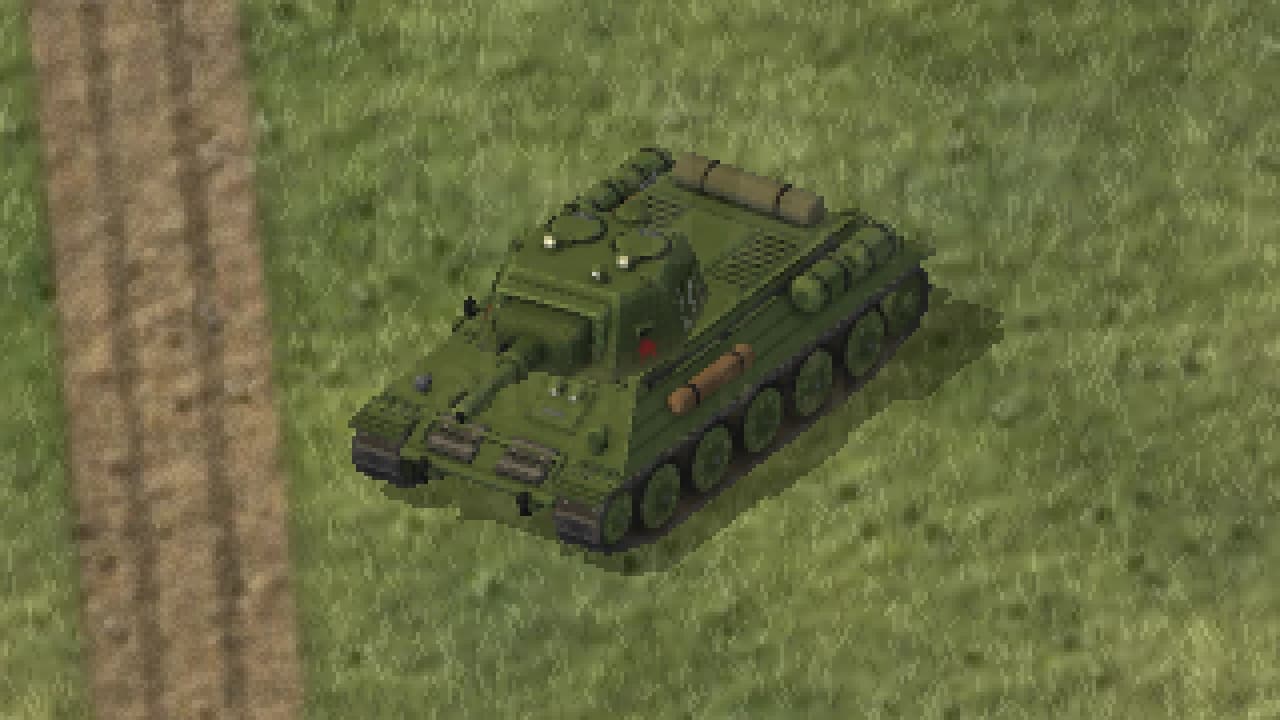
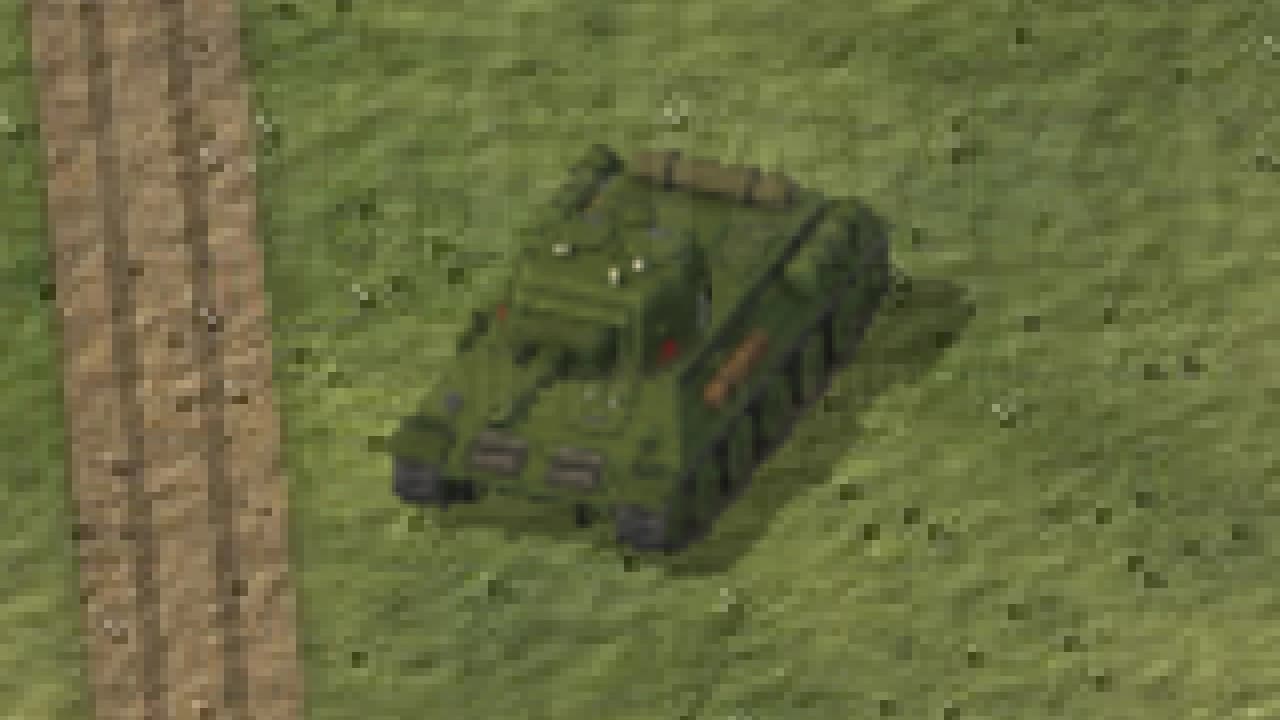
In Iron Sector the standard sprites are sampled linear. At zoom 2 every pixel centre falls a quarter or three quarters of the way across a texel, so the filter mixes 75 to 25 with the neighbour and each edge becomes a soft step two pixels wide. The ground underneath is sampled nearest and does stay in flat 2 × 2 blocks. With the standard set, only the 0.5 overview has to squeeze two texels into one pixel.
The game could have offered a continuous zoom, 1.37 or 1.8, like a map application. At a ratio like that every sprite would be resampled and the edges of pixel art would shimmer as the camera moved. Players notice the fixed steps for a minute; the shimmer they would notice forever.
Mipmaps
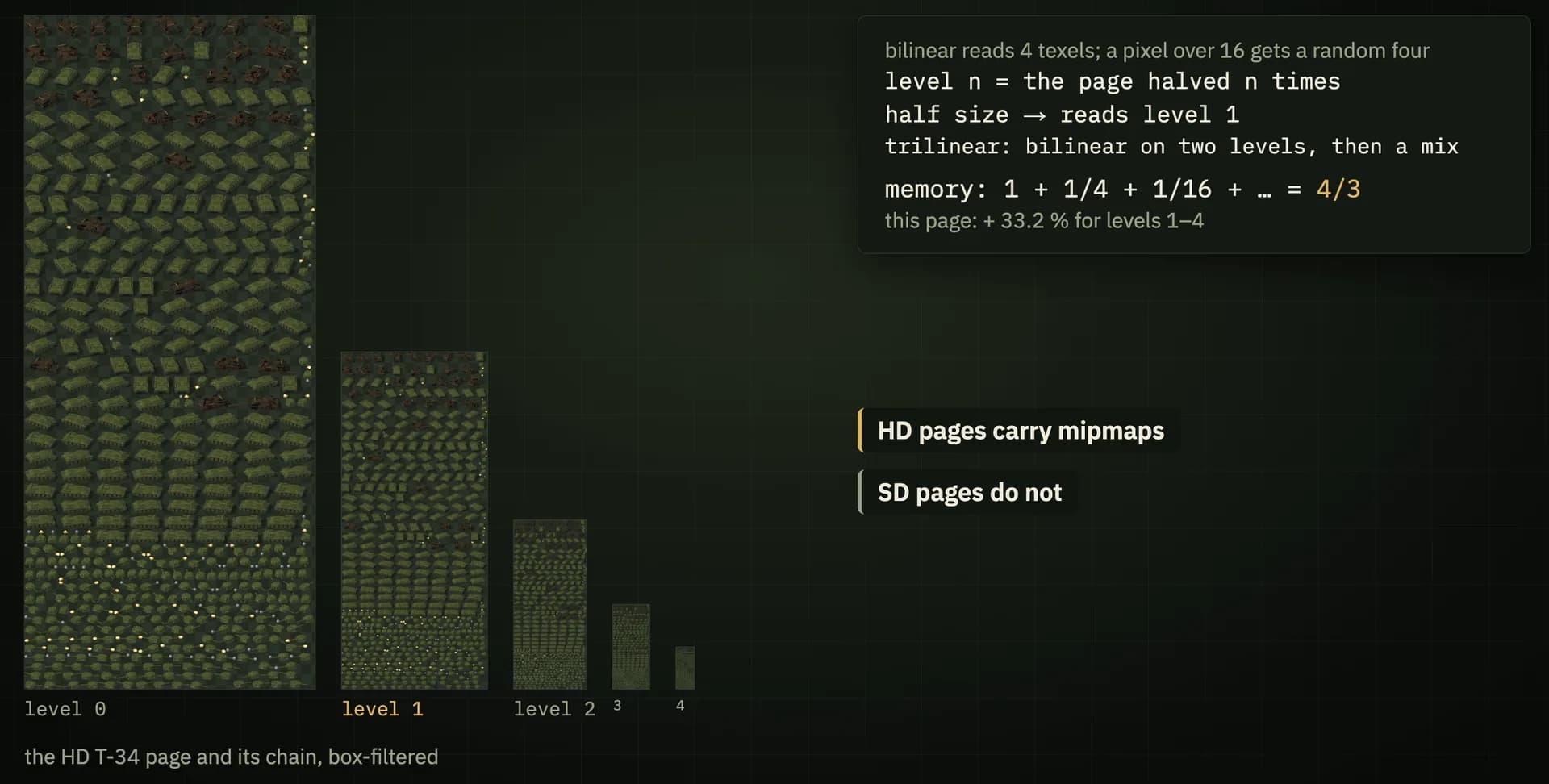
When a picture is drawn much smaller than it is stored, bilinear sampling is not enough. It only ever looks at four texels, so a pixel that covers sixteen of them gets a random four. The fix is older than 3D games: mipmaps.
The card keeps a chain of smaller copies of each texture. Every level is half as wide and half as tall as the one before, and each of its texels is the average of four texels of the level above. A sprite drawn at half size reads from level 1, where the averaging has already been done properly. Between two levels it can blend as well, which is called trilinear filtering.
The chain costs a third more memory. Each level has a quarter of the area of the one before, and a quarter plus a sixteenth plus a sixty-fourth, and so on, adds up to one third.
The HD pages carry mipmaps, because at zoom 1 and 0.5 they are drawn at half and quarter size. The standard pages do not. At zoom 1 one standard texel is one pixel, so there is nothing to average, and at the 0.5 overview linear sampling lands exactly between four texels and averages them, the same box filter a mipmap level would use.
level n = (width / 2ⁿ) × (height / 2ⁿ)
memory = 1 + 1/4 + 1/16 + 1/64 + … = 4/3
T-34 HD page, levels 1–4: 1/4 + 1/16 + 1/64 + 1/256 = +33.2 %
Two sets, one scale
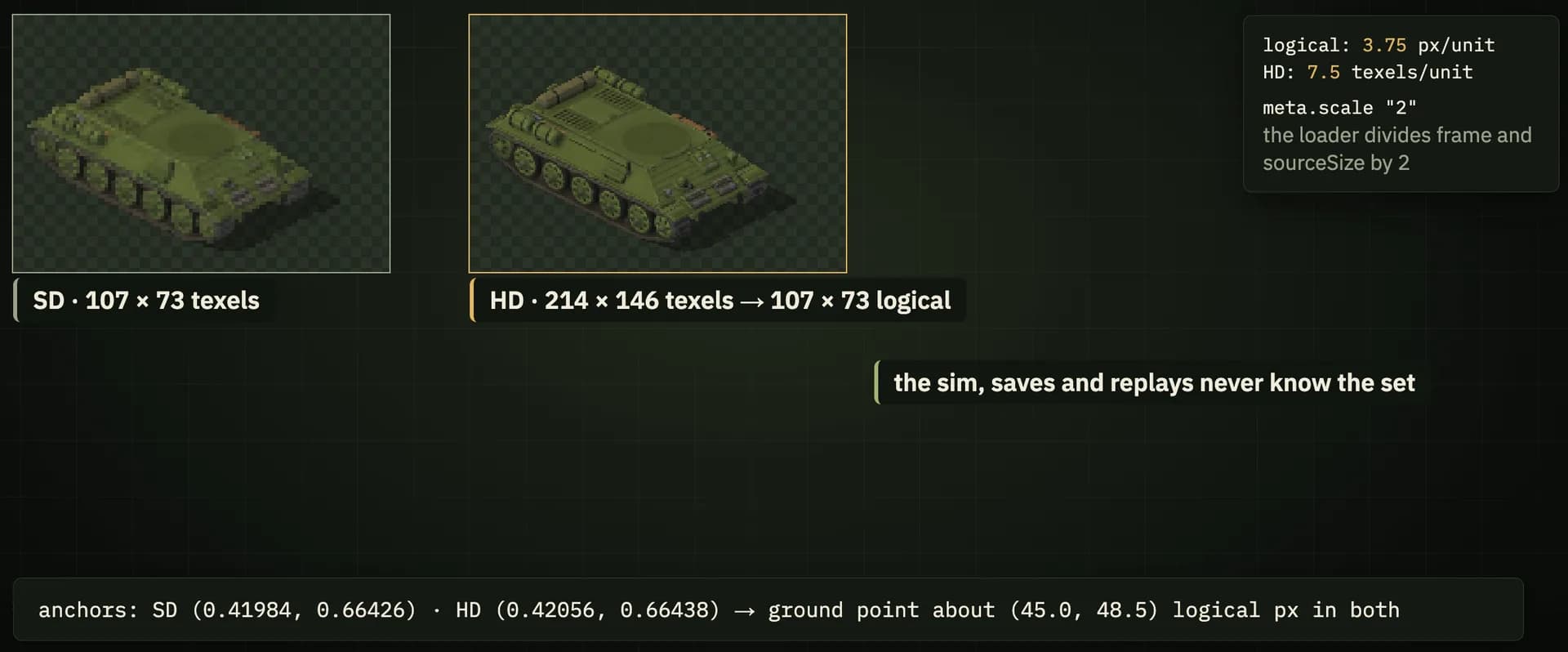
Both sets are rendered from the same 3D models with the same fixed camera. The standard set (SD) is rendered at 3.75 texels per unit of the world, the high definition set (HD) at twice that, 7.5. A T-34 hull frame that is 107 × 73 texels in SD is 214 × 146 in HD.
But the game never changes its logical scale. Every position, every offset and every anchor is in logical pixels at 3.75 per unit. The HD atlas says scale "2" in its meta block, and the loader divides every rectangle, the frame and the source size, by 2 as it reads them. To the renderer an HD frame is 107 × 73 again, drawn with four times the texels.
The anchors agree to within a thousandth: (0.41984, 0.66426) in SD and (0.42056, 0.66438) in HD. Multiply them out and the tank's ground point lands at about (45, 48.5) logical pixels in both sets. The simulation, the saves and the replays never know which set is loaded, and that rule is what makes the switch safe.
7.5 / 3.75 = 2 = meta.scale
214 × 146 ÷ 2 = 107 × 73
SD: 0.41984 × 107 = 44.9,  0.66426 × 73 = 48.5
HD: 0.42056 × 214 ÷ 2 = 45.0,  0.66438 × 146 ÷ 2 = 48.5
Snapping to the pixel
A sprite at a fractional position is a sampling problem in disguise. If its left edge sits at 100.5, pixel column 100 gets half of the sprite's first texel and half of the background, and as the sprite crawls forward that column flickers.
The cure is snapping. Before drawing, the renderer rounds every vertex to the screen's pixel grid: multiply by the zoom times the resolution, round, divide back. With the HD set this is on for every sprite. With the SD set it stays off, and those sprites keep the float positions the game has always used. In both sets the whole world layer is rounded to a whole pixel every frame.
Snapping has a price. An object moving half a pixel per frame now moves one whole pixel every second frame, which can read as a stutter. The HD set takes steady edges over smooth motion.
x' = round(x · q) / q,   q = zoom × resolution
q = 1:  x = 0, 0.5, 1, 1.5, 2  →  x' = 0, 1, 1, 2, 2
Device pixels
There is a third grid. On a high density display one CSS pixel is two or three physical pixels: a laptop that lays out a page as 1280 × 720 may have 2560 × 1440 pixels behind it. A canvas drawn at resolution 1 is scaled up by the browser to fill them, and that scaling is one more sampling step, outside the game's control.
The default render resolution, Standard, draws at resolution 1 and tells the browser to scale without smoothing, with the CSS rule image-rendering: pixelated, so the result is blocks, not blur. The second setting, Sharp, raises the canvas resolution to the device pixel ratio (DPR), capped at 2. At DPR 2 and zoom 1 one HD texel lands on exactly one physical pixel, and the picture is as crisp as the set allows.
Sharp costs four times the pixels to fill. It is a setting (Settings → Video → Render resolution) because not every machine can pay that, and on a standard display it would buy nothing.
resolution = max(1, min(DPR, 2))
DPR 1 → 1,   DPR 2 → 2,   DPR 3 → 2
DPR 2, zoom 1:  1 HD texel = 0.5 × 1 × 2 = 1 device pixel
pixels to fill at DPR 2: 2 × 2 = 4 ×
The ground is a different picture
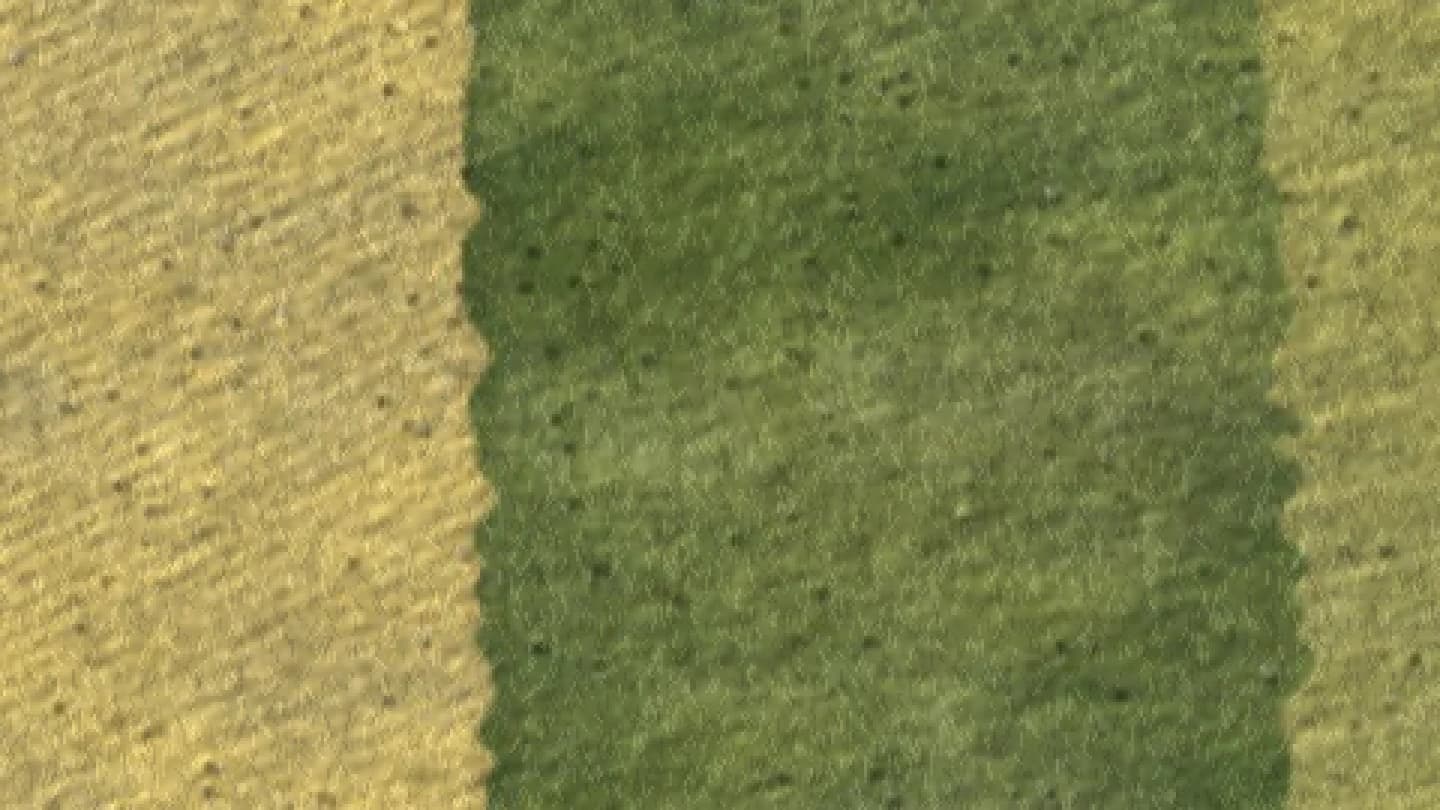
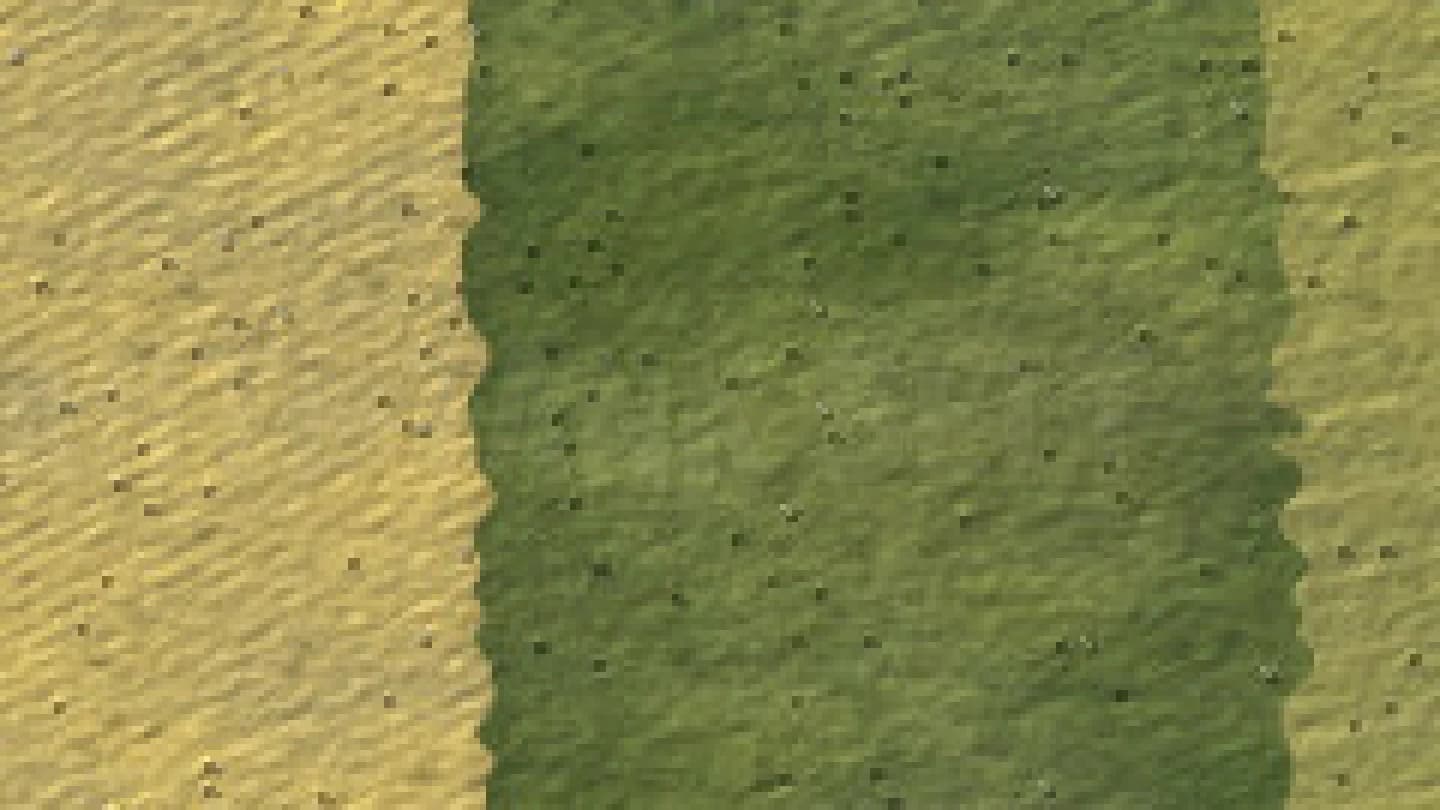
Sprites are pixel art; the ground is not. It is a large baked picture, painted with noise and blended colours and stored as chunks of 1024 × 1024 pixels. For pixel art nearest sampling is right, but a soft picture drawn at zoom 2 with nearest turns every texel into a flat square, and the field looks like a mosaic.
So the ground has its own rule. With the SD set it keeps the nearest sampling it has always had. With the HD set it is sampled linear, and on top of that the renderer adds a fine detail layer that appears only at zoom 2. The point is that the filter is not a global switch. Every texture in the game chooses its own, and getting that wrong once was a real bug.
The bug of the global default
The rendering library has a global default for how new textures are sampled. The game set it to nearest, but only after the first battle's atlases had already been loaded. So the first battle after the page was opened drew its sprites linear, slightly soft, and every battle after it drew them nearest, crisp. The same mission looked different depending on how many battles came before it.
The fix was not to move that line of code earlier. It was to stop relying on the global for sprites at all, and to keep the first battle's look, linear, for every battle. Now every atlas page states its filter when it is created. A default that depends on timing is a bug waiting for a reorder. A choice written next to the thing it applies to is not.
| Texture | SD set | HD set |
|---|---|---|
| Sprite atlas pages | linear, no mipmaps | linear + mipmaps (trilinear) |
| Ground | nearest | linear + detail layer at zoom 2 |
The automatic choice
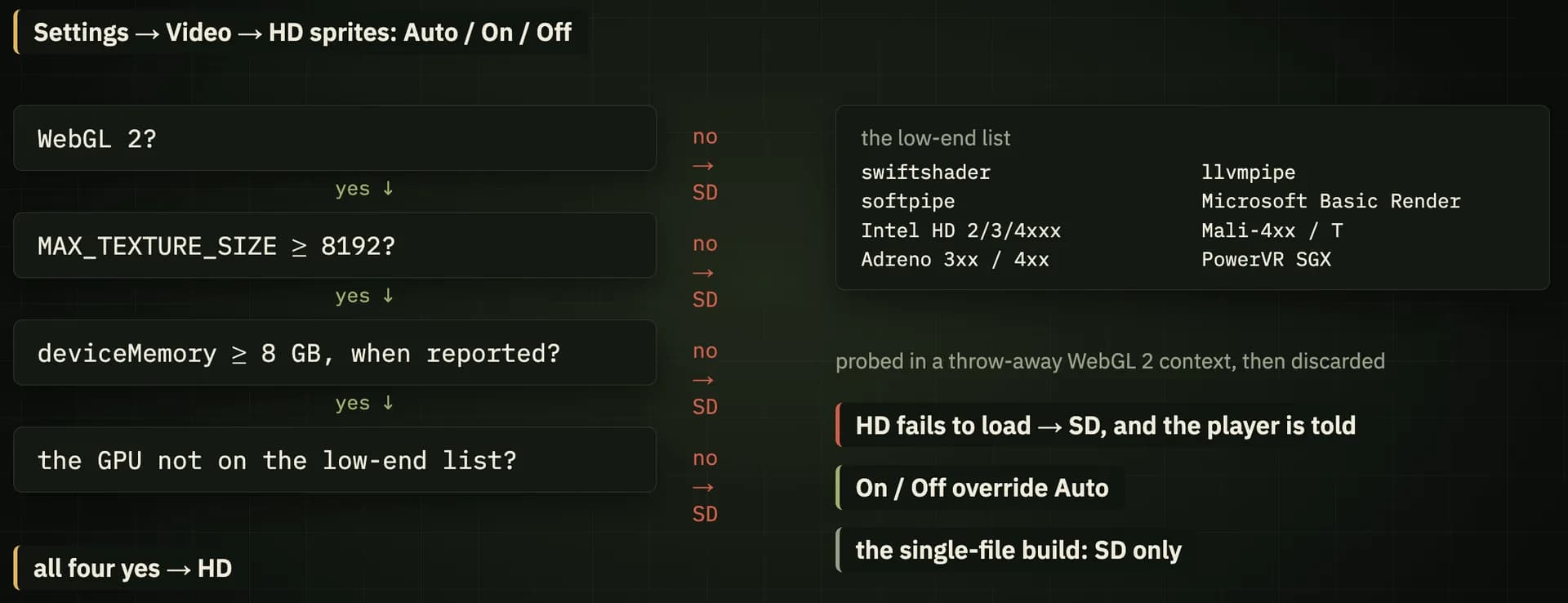
Settings → Video → HD sprites has three values, Auto, On and Off, and Auto is the default. Before the first battle Auto asks the machine four questions. Does it have WebGL 2? Can it hold a texture of at least 8192 pixels a side? If it reports its memory, is there at least 8 GB? And is the graphics chip not on a short list of parts known to struggle: software rasterisers, the basic render driver of Windows, old integrated Intel chips and old mobile GPUs? Four yeses, and the HD set loads.
The questions are asked in a throw-away WebGL 2 context that is created, probed and discarded, so the real renderer starts clean. If the HD set fails to load, for example when the graphics card runs out of memory, the game falls back to the SD set and tells the player. On and Off override Auto in either direction, and the single-file build of the game carries the SD set only.
The memory gate
Every mission has to pass a memory gate before it ships. The SD set may use at most 160 MB of texture memory for a mission. The HD set may use 512 MB, or 576 MB on the very largest maps, counted on the plain texture size.
Measured on seven missions, the SD set runs from 28 MB for the anti-tank belt at Kursk to 125 MB for a Normandy village full of houses. The same missions in HD run from 230 to 338 MB, here counted with their mipmap chains. Doubling the texels does not double the memory, it multiplies the area by about four: 4.2 for vehicles, 4.6 for infantry, a little less for props.
The largest map in the game, Goodwood, a tank battle across the Normandy plain, comes to 472 MB in HD and 630 MB with the mipmap chains. By the plain size the gate measures it passes the limit of 576; with the chains it would not. Maps like this are why the per-mission decor atlases of the previous lesson exist. When a map fails the gate, the atlases shrink, not the map.
SD ≤ 160 MB,  HD ≤ 512 MB,  largest maps ≤ 576 MB
Goodwood (UK 07), HD:  472 MB ≤ 576 MB
472 × 4/3 ≈ 630 MB > 576 MB
| Mission | SD, MB | HD with mipmaps, MB |
|---|---|---|
| USSR 00 | 37 | 313 |
| USSR 01 | 32 | 236 |
| USSR 03 | 30 | 237 |
| USSR 04 | 28 | 230 |
| UK 06 | 125 | 260 |
| USA 05 | 121 | 338 |
| GER 05 | 46 | 325 |
What it costs
At run time, sampling costs nothing you can measure. Nearest, bilinear and trilinear filtering are wired into the graphics card and run at the same speed. The price is paid elsewhere.
Memory is one price, and the gate keeps it in check. Build time is another. Rendering the HD set for every unit and building in the game took 880 seconds on 8 workers and peaked at 17.8 GB of memory, and that is with a supersampling of 2 rather than 3: 3 would have cost 2 to 2.5 times the time and about 3 times the memory, for a result nobody could tell apart. The web build with both sets was 599 MB when the HD set landed and is close to 900 MB today, most of it atlas pages. And Sharp on a dense display asks the card to fill four times the pixels of Standard, which on a laptop can mean the fan.
Two filters, three zooms, two sets, one gate. Every switch in this lesson exists because somebody has to pay for crisp.