
Sprite Atlases Explained: Ten Thousand Pictures in One Texture
Iron Sector draws its battlefield from more than 66,000 sprite frames, yet the graphics card sees only a few hundred large textures. This is how those pages are built, from frame names and trimming to bin packing, padding and anchors, with the game's real numbers.
- frames in the high-definition set
- 66,116frames in the high-definition set
- of the HD pixel area removed by trimming
- 62.8 %of the HD pixel area removed by trimming
- packings tried for every sheet
- 35packings tried for every sheet
- draw calls for a screen of static objects
- 4draw calls for a screen of static objects
Why one picture and not ten thousand
A tank in Iron Sector is many pictures. Its sprites are rendered once from 3D models from a fixed camera, and every state the game can show needs its own frame: a hull for every direction and track phase, a turret for every direction, three firing frames, two wrecks. That is 192 pictures in the standard set and 480 in the high-definition set, and with every vehicle, gun, soldier, house, tree and effect the high-definition set passes 66,000.
A graphics card does not like 66,000 small textures. Whenever the next sprite lives in a different texture, the GPU must stop, switch and start a new batch. So the pictures are glued into large pages called atlases, and a sprite becomes a rectangle inside a page. Consecutive sprites from the same page share one batch and one draw call; in Iron Sector a whole screen of static objects takes about four.
This lesson shows how those pages are built, and three tricks that cut the pixel count roughly in half in the standard set and to well under half in the high-definition set.
The names of frames
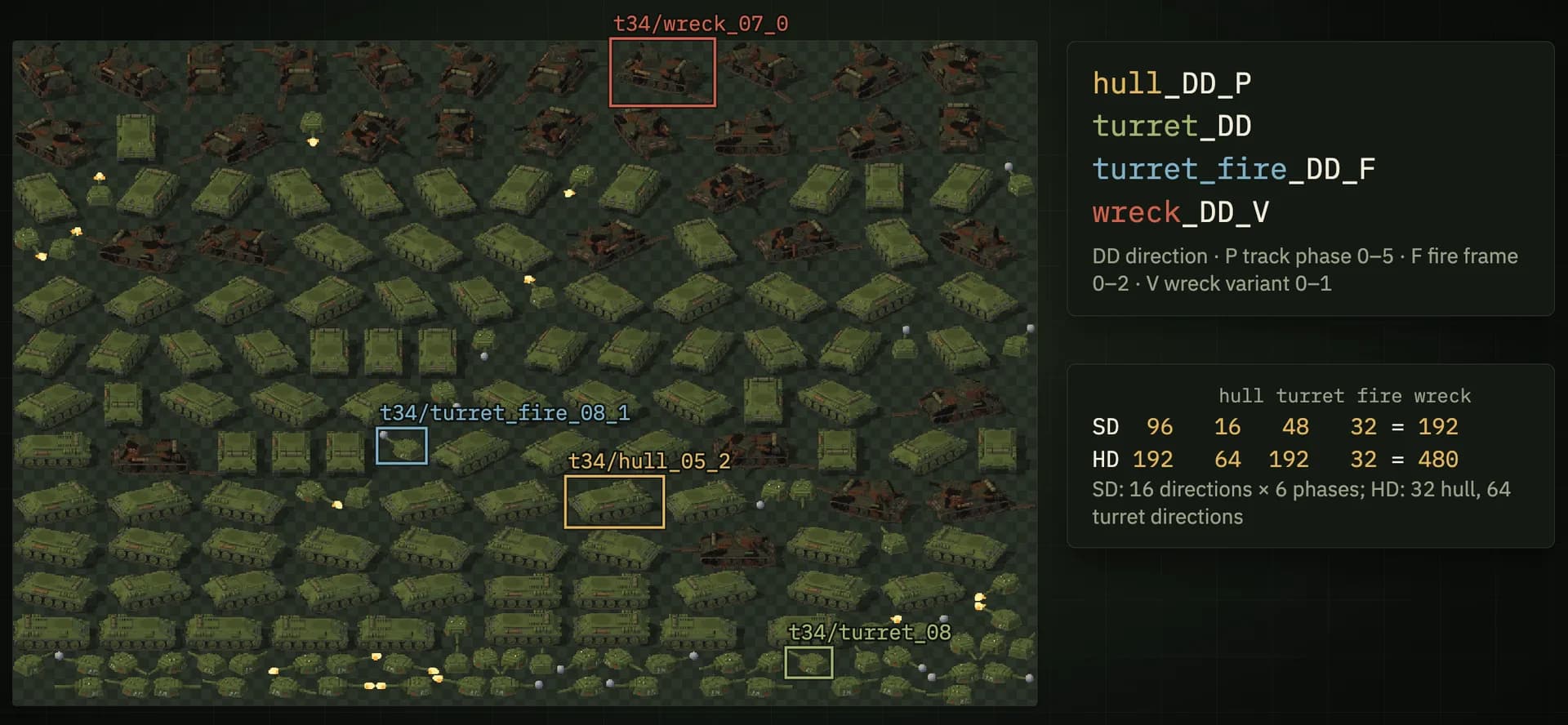
Every frame has a name, and the names form a small language. A hull frame is hull, a two-digit direction, then the track phase: t34/hull_05_2. A turret frame is turret and its direction; a firing turret adds the fire frame, 0 to 2; a wreck has a variant, 0 or 1.
In the standard set a tank has 16 directions and 6 track phases: 96 hull frames, 16 turrets, 48 firing turrets and 32 wrecks, the 192. The high-definition set has 32 hull and 64 turret directions, and the same arithmetic gives 480. A soldier is named by pose and one of 8 directions: cycles for walking, running, crawling, throwing, loading and carrying, three ways of dying and 11 still poses, 83 in all, or 664 frames for one kind of soldier.
The renderer never looks at pixels to find a frame. It builds the name from the state of the unit and asks the atlas for that rectangle.
hull_DD_P · turret_DD · turret_fire_DD_F · wreck_DD_V
SD T-34: 16×6 + 16 + 16×3 + 16×2 = 96 + 16 + 48 + 32 = 192
HD T-34: 32×6 + 64 + 64×3 + 16×2 = 192 + 64 + 192 + 32 = 480
ussr_rifleman: (6×8 + 3×8 + 11) × 8 = 83 × 8 = 664
The full frame and the trimmed rect
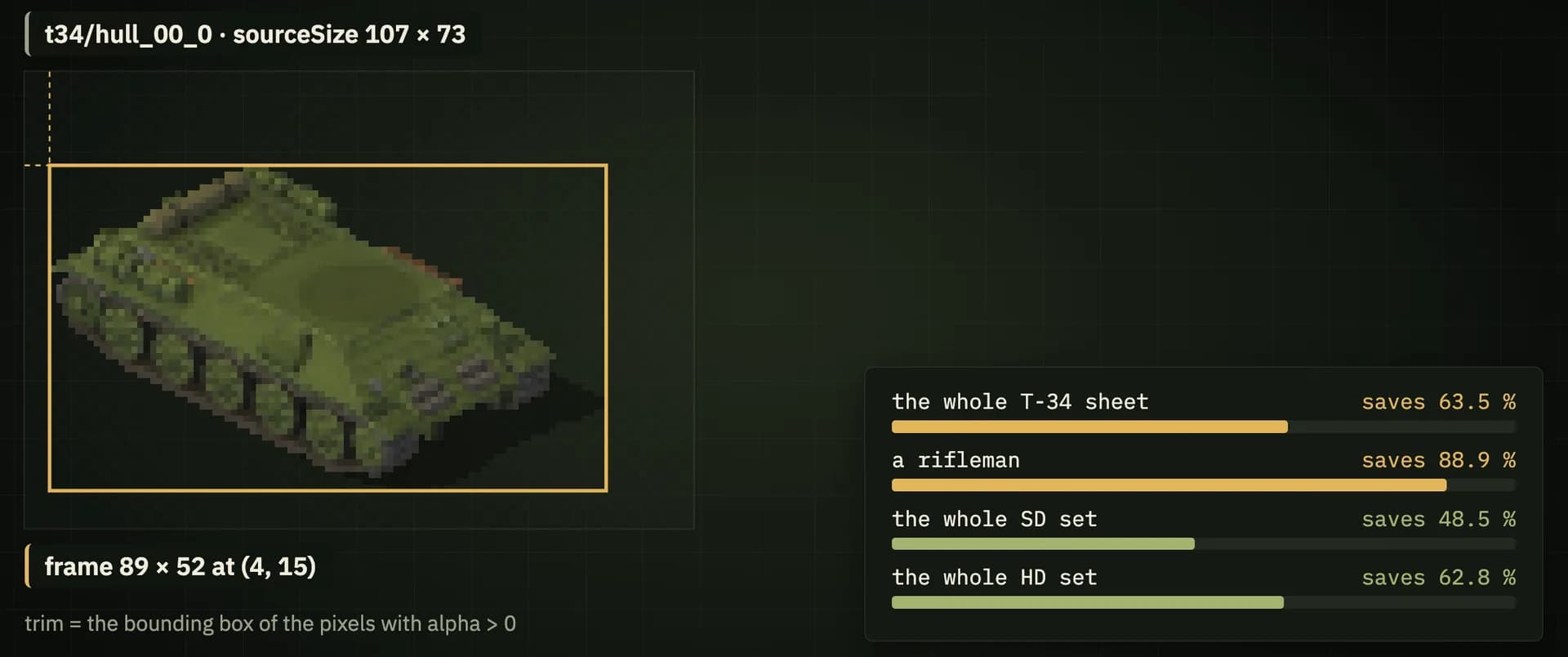
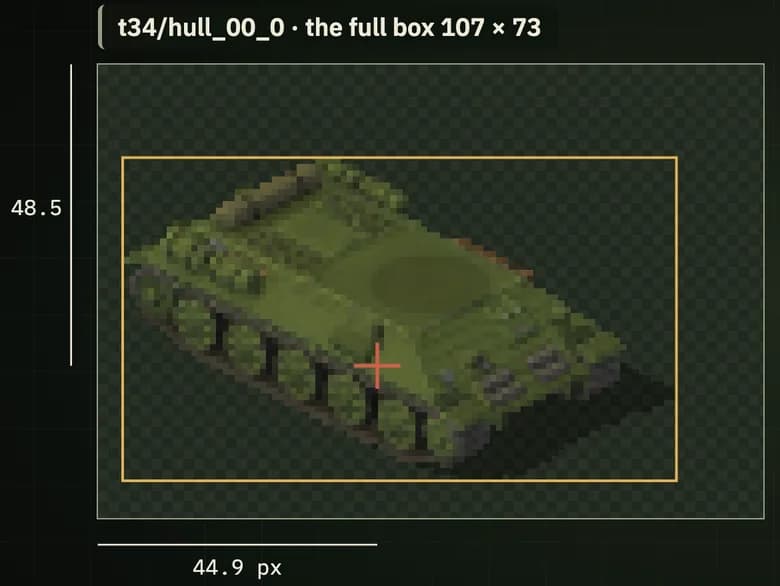
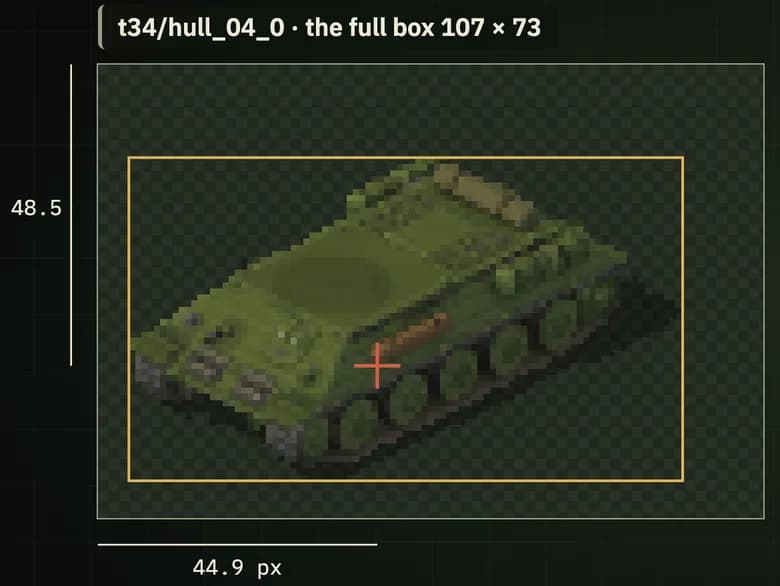
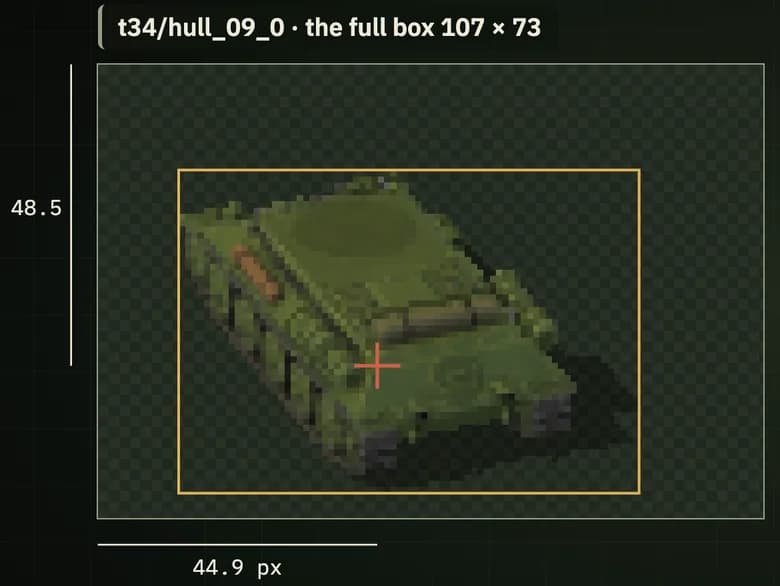
Here is the first trick. Every hull frame of a tank is rendered into the same 107 × 73 box, so that any direction fits. But a tank seen from the front is narrower than from the side, and much of the box is usually empty.
Trimming cuts each frame down to the bounding box of its opaque pixels, those with alpha above zero. The frame t34/hull_00_0 becomes 89 × 52 pixels, starting 4 pixels in and 15 down inside the full box. The trimmed size and its offset are stored, and the full box is kept as the source size.
Over a whole tank sheet trimming throws away about two thirds of the area (63.5 % for the T-34); for a soldier almost nine tenths (88.9 %), because a man is a thin shape in a box that must also fit a prone pose and a throw. Over the standard set it nearly halves the pixel area, over the high-definition set it saves 62.8 %. Nothing visible changes: the empty pixels were never going to be seen.
trim = bbox(alpha > 0)
t34/hull_00_0: 107×73 = 7811 px → 89×52 = 4628 px @ (4, 15)   −40.8 %
saving = 1 − Σ(trimmed w·h) / Σ(sourceSize w·h)
SD: 1 − 0.5150 = 48.5 %    HD: 1 − 0.3723 = 62.8 %
The same picture twice
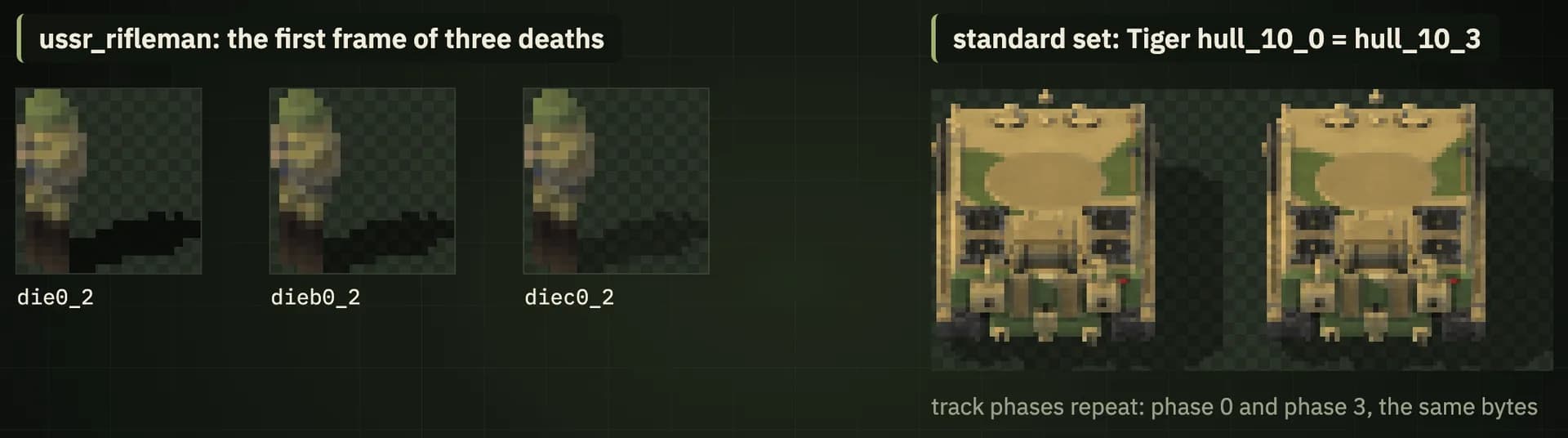
The second trick is smaller, but free: some frames are identical, pixel for pixel. The three ways a soldier dies all start from the same standing pose, so their first frames match. Seen from the side, a track pattern repeats every three phases, so phase 0 and phase 3 can match too: in the standard set the Tiger's hull_10_0 and hull_10_3 are the same bytes.
The packer computes a checksum of each trimmed frame. If a frame of the same size with the same bytes has already been placed, the new name simply points at the old rectangle. This is aliasing. Every name keeps its own entry in the description, so the game never knows that two names share pixels.
It saves 1.8 % of the trimmed area in the standard set and 3.6 % in the high-definition set. It costs nothing and it is deterministic: the checksum is a plain CRC-32, never a hash that changes from one run to the next.
key = (w, h, crc32, bytes)
die0_2 = dieb0_2 = diec0_2 → frame [611, 90, 21, 21]
Packing is a puzzle
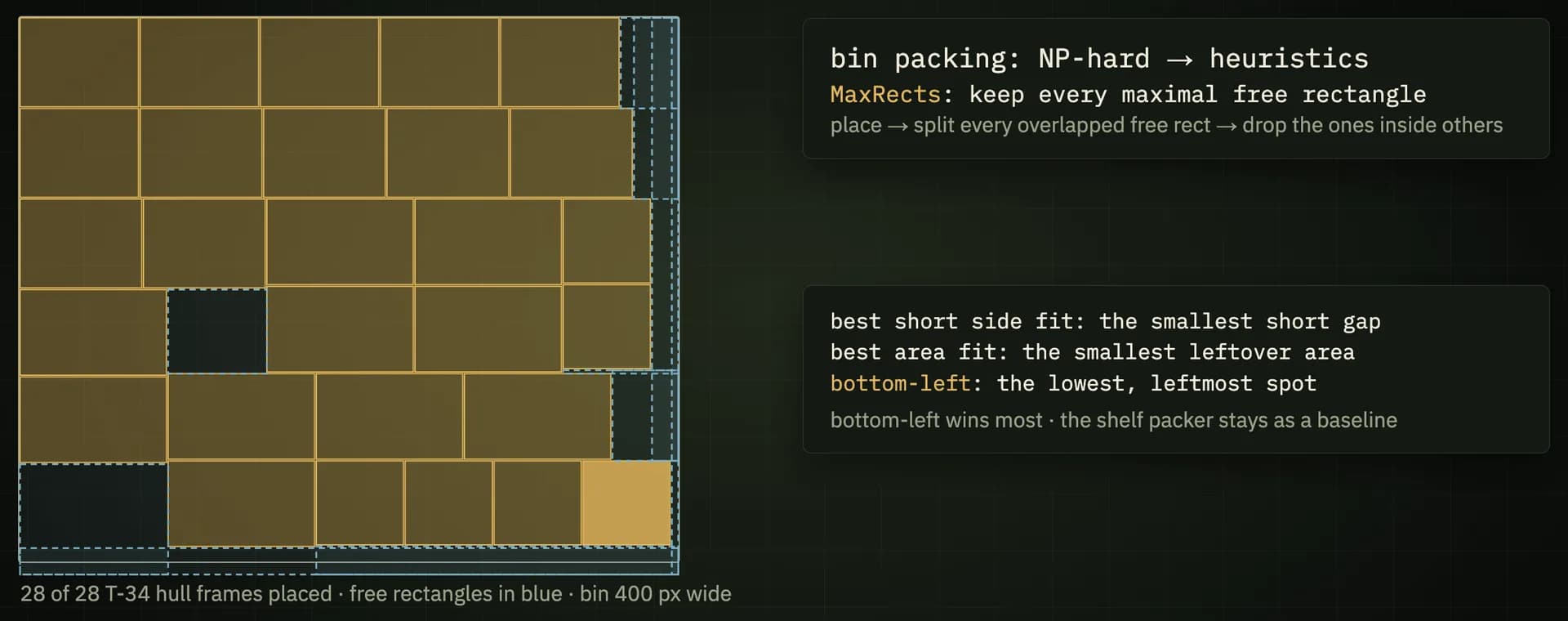
Now the frames must go into pages as tightly as possible. That is two-dimensional bin packing, and finding the best arrangement of a few thousand rectangles is NP-hard, so the packer uses a good heuristic: MaxRects.
MaxRects keeps a list of every maximal free rectangle in the page, the largest empty rectangles that still fit, and scores each one for the next frame. Best short side fit prefers the spot where the shorter leftover gap is smallest, best area fit the smallest leftover area, and bottom-left simply the lowest, leftmost spot. In this project's search bottom-left wins most often; the old row-by-row shelf packer stays in the contest as a baseline.
After a placement, every free rectangle the frame overlaps is split into the pieces that remain, and any free rectangle contained in another is dropped. It is simple, fast enough for sixty thousand frames, and fills pages to about 90 %.
BSSF: min(F.w − w, F.h − h) → min
BAF:  F.w·F.h − w·h → min
Trying every answer
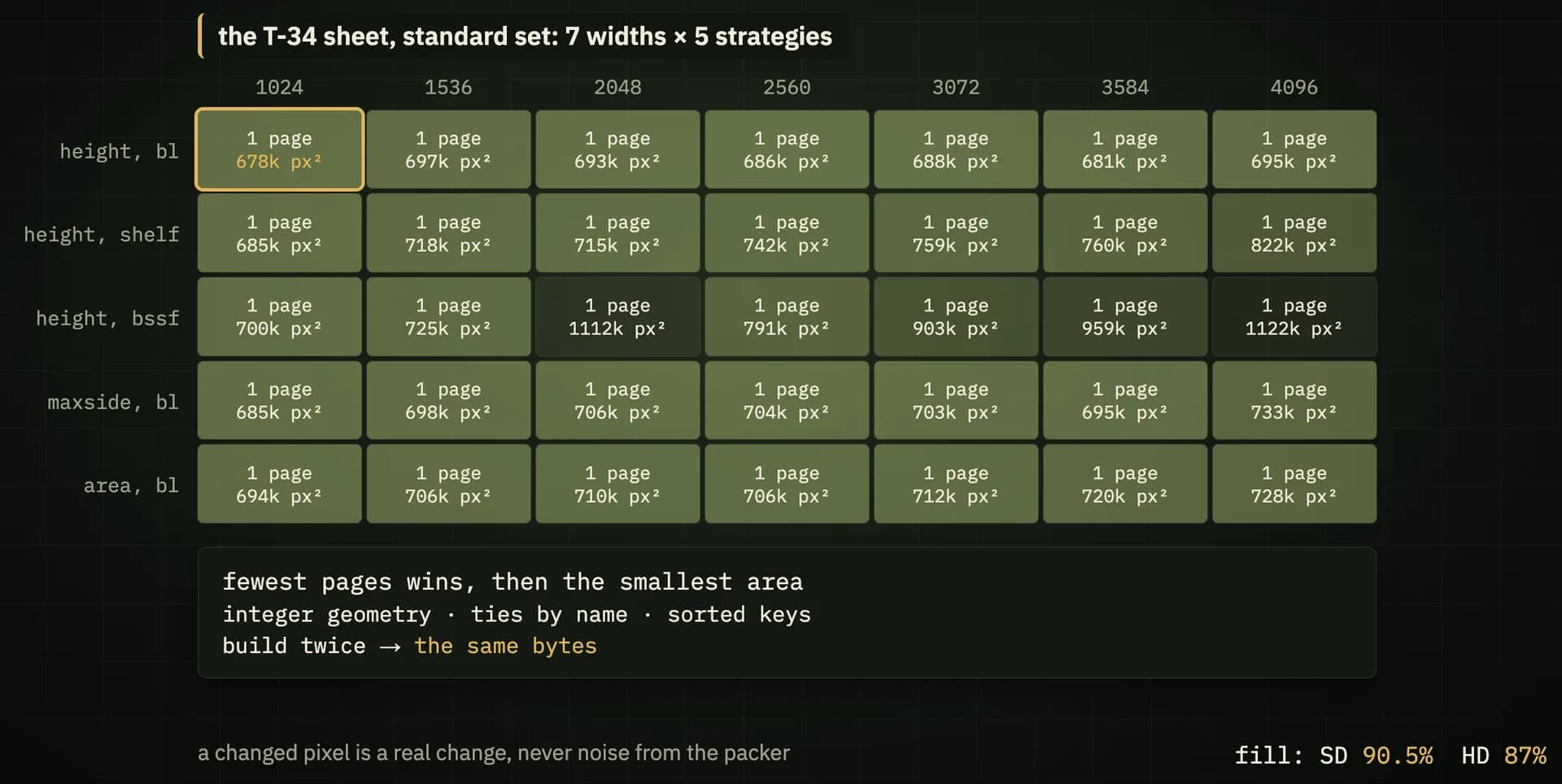
A heuristic can be unlucky, so the packer does not trust one run. It tries seven page widths, from 1024 to 4096 pixels in steps of 512, and five combinations of sorting order and placement rule: up to 35 packings per sheet. The fewest pages wins; among equals, the smallest total area.
One requirement matters more than density: the same frames must give the same result. All geometry is in integers, ties are broken by name, and the description is written with sorted keys, so two builds produce the same bytes. A sheet can live in version control, and a changed pixel is always a real change, never noise from the packer.
Standard pages come out about 90 % full, high-definition pages about 87 %. The next chapter shows where those few percent go.
widths = 1024, 1536, …, 4096 → 7 × 5 = 35
best = min(pages, area)
T-34 SD: (height, bl, 1024) → (1, 677586 px²)
The gap between frames
Frames cannot touch. A filtered sample near the edge of a rectangle mixes in the texel just outside it, which belongs to the neighbouring frame, and a tank would get a stripe of the next tank's colour along its edge. So the packer leaves a gap: 1 pixel in the standard set, enough for an edge sample to find transparent black.
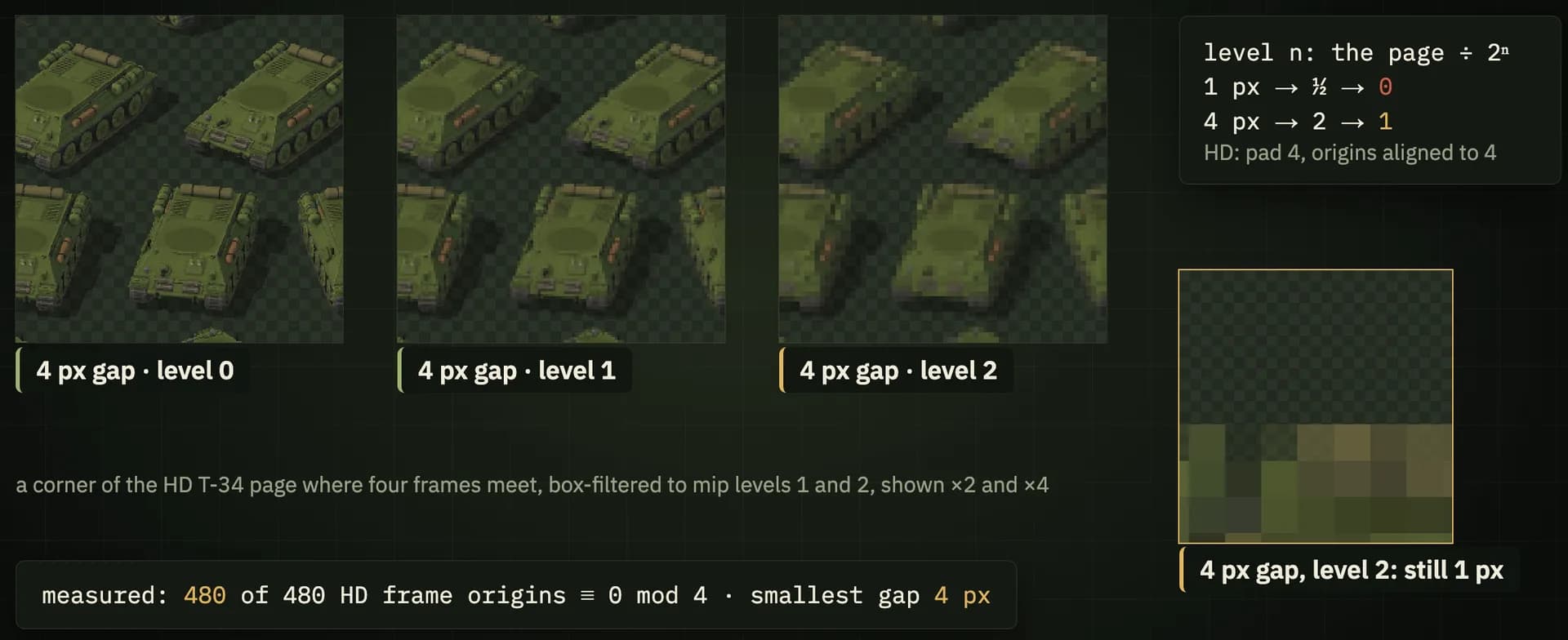
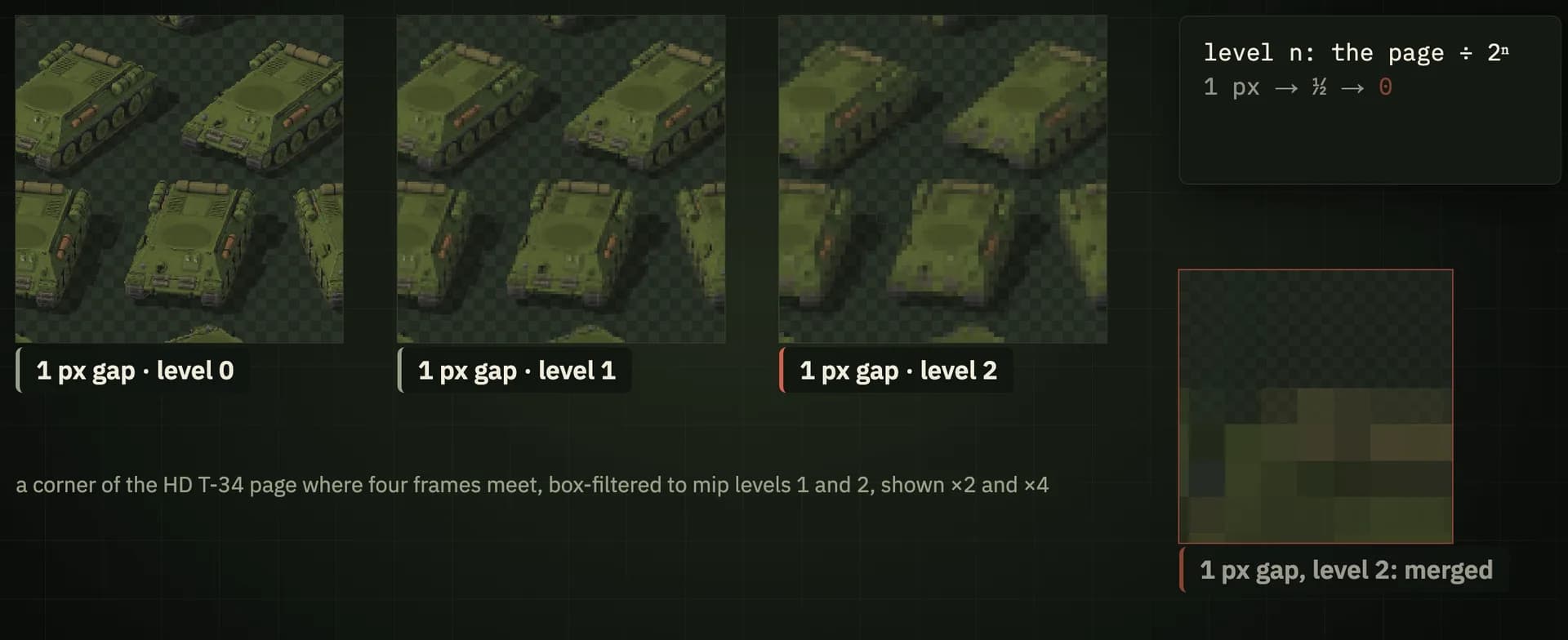
High-definition pages also carry mipmaps, smaller copies used when the picture is drawn smaller: level 1 is half size, level 2 a quarter. A 1-pixel gap becomes half a pixel at level 1 and nothing at level 2, and the frames bleed together again. So the high-definition packer uses a 4-pixel gap and puts every frame's origin on a multiple of 4; at level 2 a whole pixel remains.
We checked the built atlases: all 480 frame origins on the T-34's high-definition page sit on a multiple of 4, and the smallest gap is exactly 4.
mip level n = size / 2ⁿ
gap 1 px → ½ → 0
gap 4 px → 2 → 1
HD: x ≡ y ≡ 0 (mod 4)
When a page is not enough
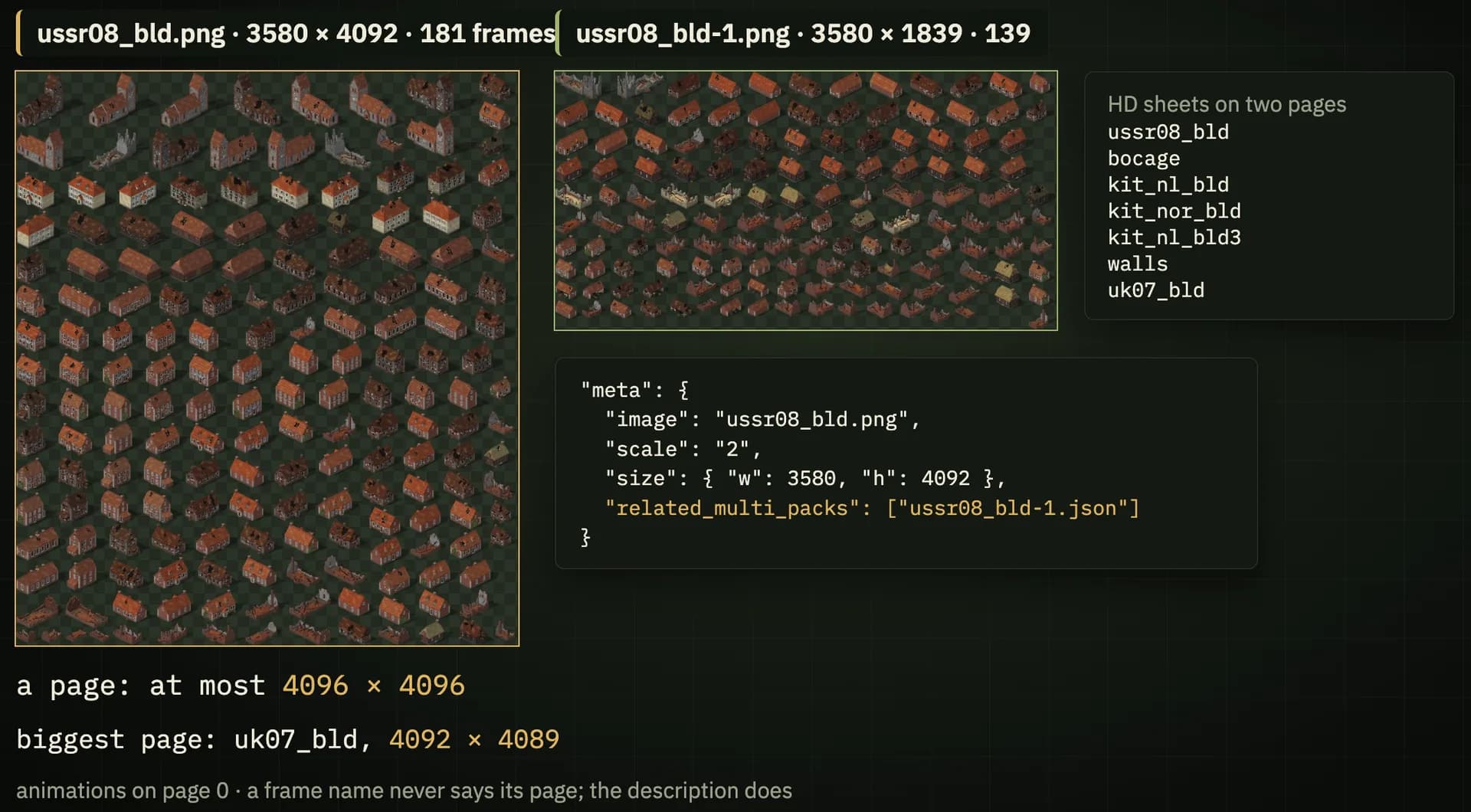
Most graphics cards accept textures up to 16,000 pixels a side, but older and mobile ones stop at 4096, and that is the limit Iron Sector builds for. When a sheet does not fit, the packer opens a second page: ussr08_bld-1.png next to ussr08_bld.png. The first page's description lists its siblings, so the loader fetches them all and the frame names still look like one sheet.
Every standard sheet fits on one page. In the high-definition set seven sheets need two, all of them buildings, walls and hedgerows: a block of tenements seen from one camera is a very large picture. The biggest page is 4092 × 4089 pixels, four short of the limit because of the 4-pixel gap and alignment.
The rest is convention: animation tables are written on the first page only, and a frame name never says which page it lives on. The description does.
max side = 4096 − 4 = 4092 → uk07_bld: 4092 × 4089
The point on the ground
Every frame also stores its anchor: the point on the ground directly under the centre of the object, as a fraction of the full box. For the T-34's hull it is 0.42 of the width and 0.66 of the height, about 45 pixels from the left and 48 from the top.
The renderer puts the anchor on the unit's ground point, computed with the camera maths of the first lesson, and the trimmed pixels land at the position, minus the anchor times the full box, plus the trim offset.
This is the reason for the common box. Every frame in a group shares one source size, so the anchor is the same fraction in all of them, and the ground point stays put when the frame changes. The tank turns, the trimmed rectangle slides around inside the box, and the cross does not move by a pixel. A unit that jumped whenever it turned would be unplayable.
anchor = groundPoint / sourceSize
t34/hull: (0.41984·107, 0.66426·73) = (44.9, 48.5) px
pixels = position − anchor·sourceSize + trim
hull_00_0: position − (44.9, 48.5) + (4, 15) = position − (40.9, 33.5)
The description file
The description is plain JSON in the hash format that TexturePacker made standard more than a decade ago. Each frame has its rectangle on the page, its trimmed rectangle inside the full box, the full box itself and the anchor. A rotated frame would say so, but this packer never rotates: the sprite would have to be turned back at run time.
The meta block holds the page's image and size, the scale of the set (1 or 2) and the sibling pages. A separate file holds what a sprite cannot say about itself: where the turret pivot sits on each hull, how far the tank travels before its track pattern repeats, how many directions each group has. Both are read once, at load; from then on a sprite is a name, a rectangle and an anchor.
"t34/hull_00_0": {
  "frame": { "x": 279, "y": 181, "w": 89, "h": 52 },
  "rotated": false, "trimmed": true,
  "spriteSourceSize": { "x": 4, "y": 15, "w": 89, "h": 52 },
  "sourceSize": { "w": 107, "h": 73 },
  "anchor": { "x": 0.41984, "y": 0.66426 }
}
"meta": { "image": "t34.png", "scale": "1", "size": { "w": 1022, "h": 663 } }What it all saves
Stored at full size, every frame of the standard set would come to 1,762 MB of pixels; after trimming, aliasing and packing, the pages come to 962 MB. For the high-definition set it is 7,750 MB against 3,157 MB.
Today the standard set is 228 sheets, 55,404 frames and 211.7 MB of PNG on disk, each sheet on one page; the high-definition set is 201 sheets on 208 pages, 66,116 frames and 539.7 MB.
On the graphics card a page is not compressed: 4092 × 4089 pixels at four bytes each is 67 MB, and a mission loads many pages. So each mission also gets its own decor atlas, repacking only the frames of buildings and props that its map can show: 22 to 25 % of the decor sheets' area. The rest never leaves the disk.
VRAM = w × h × 4 B
4092 × 4089 × 4 B = 66.9 MB ≈ 67 MB
SD: 1762 MB → 962 MB    HD: 7750 MB → 3157 MB
| Standard set | High definition | |
|---|---|---|
| Sheets | 228 | 201 |
| Pages | 228 | 208 |
| Frames | 55,404 | 66,116 |
| PNG on disk | 211.7 MB | 539.7 MB |
| All frames at full size (RGBA) | 1,762 MB | 7,750 MB |
| Packed pages (RGBA) | 962 MB | 3,157 MB |
| Saved by trimming | 48.5 % | 62.8 % |
| Saved by aliasing (of the trimmed area) | 1.8 % | 3.6 % |
| Page fill | about 90 % | about 87 % |
A short history of the sheet
Sprite sheets are as old as sprites. Arcade boards of the 1980s kept characters as fixed cells in read-only memory, and a frame was a cell number. PC games of the 1990s stored whole sheets as bitmaps, with one loud colour, often magenta, standing in for transparency, and artists arranged the frames by hand.
Packing became worth solving once sheets grew past a thousand frames. In 2010 Jukka Jylänki compared the known heuristics in “A Thousand Ways to Pack the Bin” and described MaxRects; around the same time TexturePacker established the JSON layout that engines still read. What is new in Iron Sector is the scale, sixty thousand frames and a packer reproducible to the byte, and frames that come out of a renderer, not a brush.
What it costs
At run time an atlas costs almost nothing, and that is the point. On a stress map with 6,006 static objects, 952 of them on screen at the widest zoom, the whole frame takes four draw calls at zoom 0.5 and 1 and two at zoom 2 (5, 4 and 2 with the high-definition set). The pages, mipmaps included, are uploaded when the battle loads, so the first frames never stall on a texture upload.
The cost sits elsewhere. Packing runs once, at build time: a few seconds per sheet, about a minute for the largest. Memory is the real price, paid in pages: a page costs 67 MB whether it is full or half empty, which is why the packer tries 35 arrangements to save one. A little build time buys a flat, predictable frame.
Summary
That is the atlas: trimmed, aliased, packed, padded and described. The next lesson follows those pixels to the screen, drawn at a size that is not their own.