
Painting Ten Million Pixels: How a 2D Game Bakes Its Ground
Iron Sector does not build its ground from tiles: every map is one picture, almost 20 million pixels for a single battlefield, painted once by a baking tool and loaded as it is. This lesson follows that picture from value noise and a four-line grass recipe to the polish pass, the JPEG file, the shader that adds detail and the minimap, with the game's real numbers.
- pixels in the Kursk map, painted once
- 19.35 Mpixels in the Kursk map, painted once
- chunks of 1024 × 1024 for that map
- 21chunks of 1024 × 1024 for that map
- on disk for 77.4 MB of pixels
- 6.5 MBon disk for 77.4 MB of pixels
- octaves of value noise under every patch of grass
- 4octaves of value noise under every patch of grass
The map is one picture
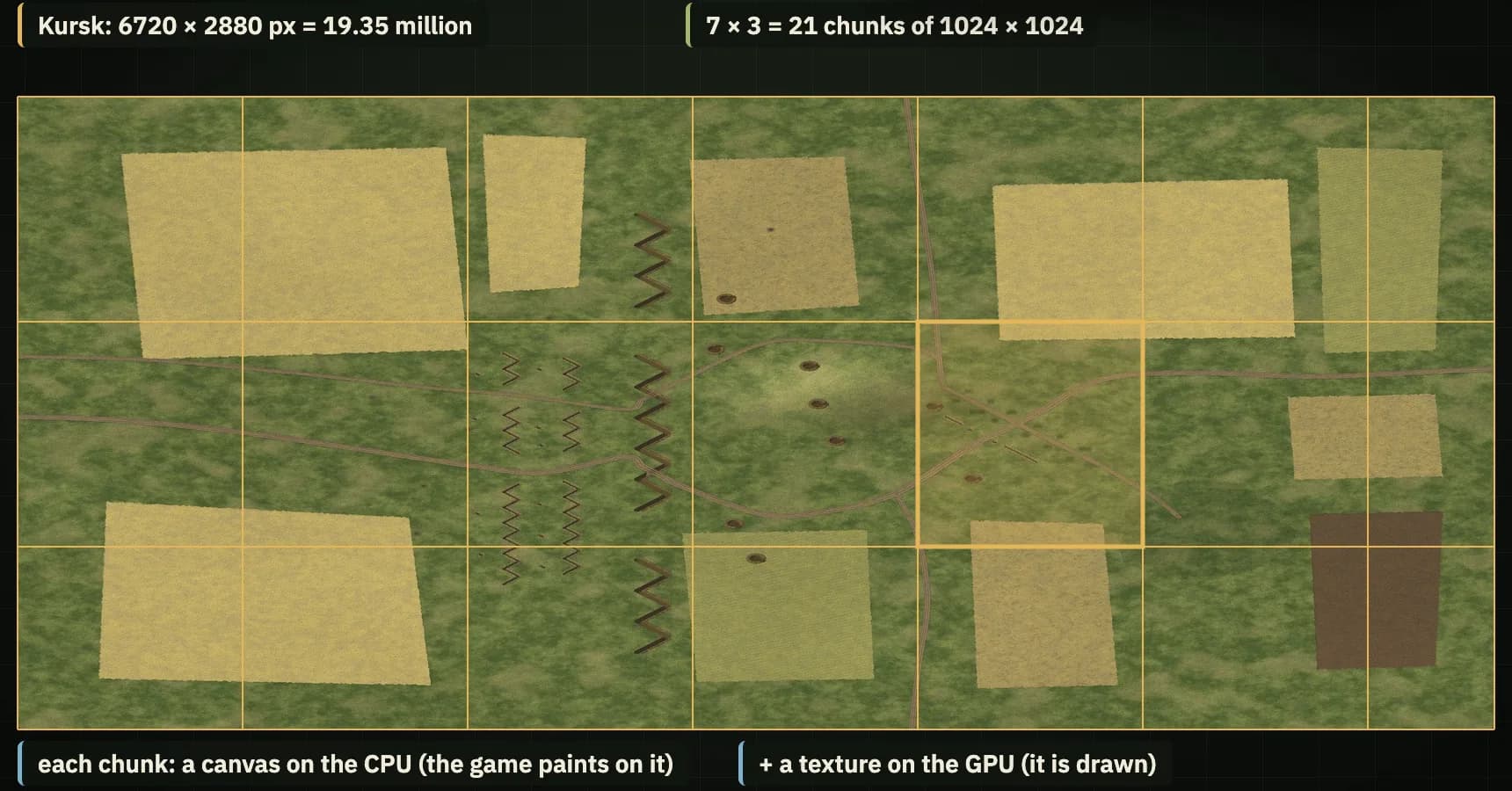
In a tile game the ground is a grid of small repeated pictures, and players learn to see the seams. In Iron Sector the ground is one picture. The Kursk map is 6720 × 2880 pixels, 19.35 million of them, painted once by a baking tool before the game ships and loaded as it is.
A picture that size does not fit in one texture, so it is cut into chunks of 1024 × 1024 pixels: 7 across and 3 down, 21 chunks. Each chunk lives twice: as a canvas on the processor, so the game can paint on it, and as a texture on the graphics card, so it can be drawn. At 4 bytes per pixel, 8 bits each for red, green, blue and alpha, one copy of the Kursk map is 77.4 MB.
Maps vary a lot in size. The smallest, a farm of 1920 × 1000 pixels, is 2 chunks. The largest, Goodwood, is 18 × 7 = 126 chunks, and the project's map standard stops at 140. Nothing in any of them repeats: every field, every road and every patch of dry grass is painted where it is. The rest of this lesson is how.
6720 × 2880 = 19.35 M px
⌈6720 / 1024⌉ × ⌈2880 / 1024⌉ = 7 × 3 = 21
6720 · 2880 · 4 B = 77.4 MB
farm: 2  ·  Kursk: 21  ·  Goodwood: 18 × 7 = 126  ·  max: 140
Value noise
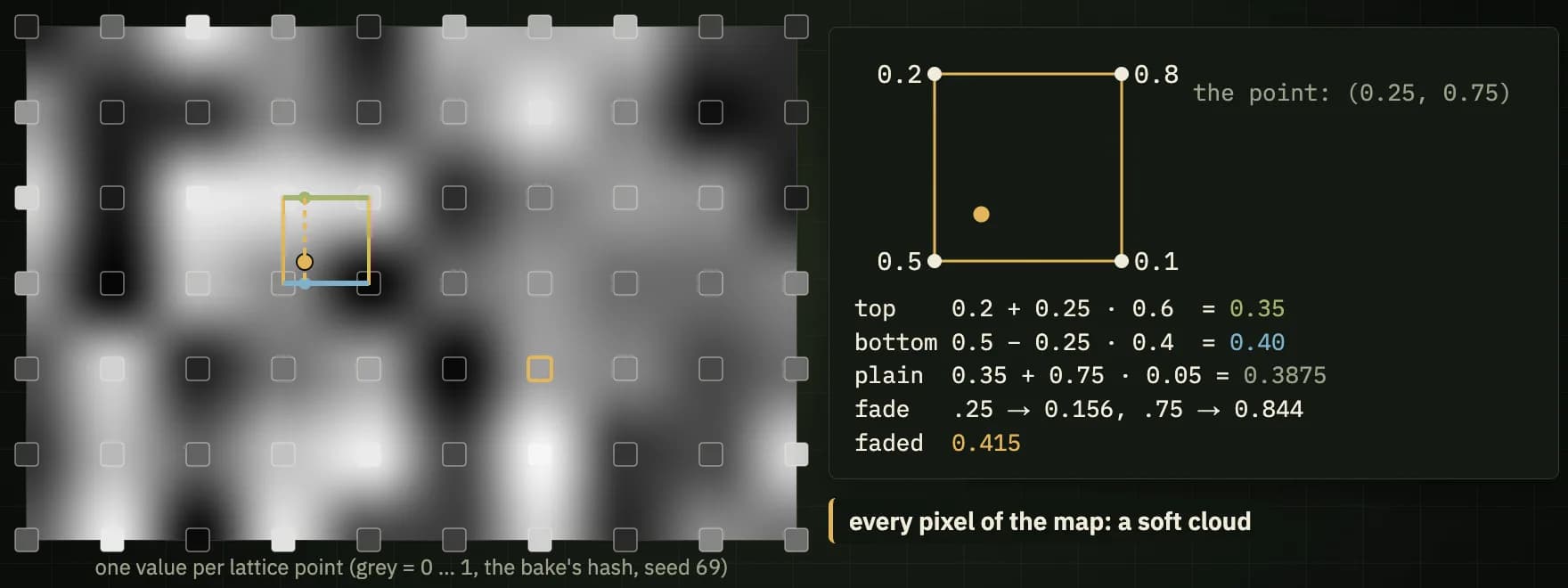
Everything natural in the ground starts with noise, and the kind used here is the simplest: value noise. Imagine a grid of integer points, a lattice, and give each point a random number between 0 and 1. Random, but repeatable: the number is a hash of the point's coordinates. Multiply x by 127.1, y by 311.7 and a seed by 74.7, add them up, take the sine, multiply by 43758.5453 and keep only the fractional part. The same point always gives the same number, and neighbouring points give unrelated ones.
Between the lattice points the noise blends. Find the four corners of the cell around the point, blend the top pair by the horizontal fraction, the bottom pair the same way, then blend those two results by the vertical fraction. Plain fractions leave a crease along every lattice line, because the slope jumps there, so each fraction first passes through a fade curve, 3t² − 2t³, which is flat at both ends.
One cell as an example: 0.2 and 0.8 on top, 0.5 and 0.1 below, and a point a quarter of the way across and three quarters down. With plain fractions the top blend is 0.35, the bottom 0.40 and the result 0.3875. With the fade, 0.25 becomes 0.156 and 0.75 becomes 0.844, and the result is 0.415. Do that for every pixel of the map and you get a soft cloud.
hash(ix, iy) = fract(sin(ix·127.1 + iy·311.7 + seed·74.7) · 43758.5453)
fade(t) = 3t² − 2t³
0.2 + 0.25·(0.8 − 0.2) = 0.35;   0.5 + 0.25·(0.1 − 0.5) = 0.40
0.35 + 0.75·(0.40 − 0.35) = 0.3875
fade(0.25) = 0.156,  fade(0.75) = 0.844  →  0.294, 0.4375  →  0.415
A sum of clouds
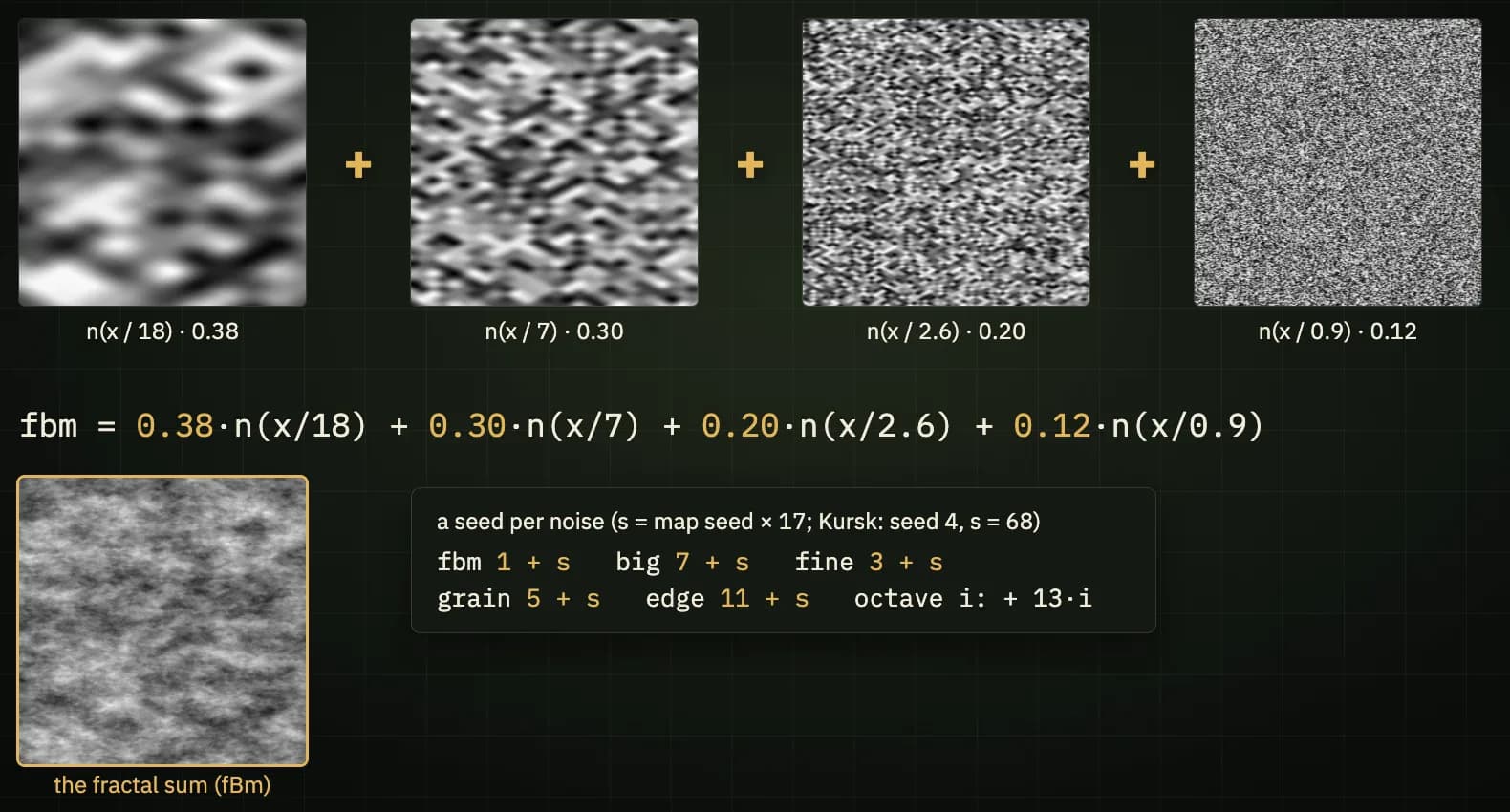
One cloud looks like a cloud. Grass looks like grass because it has structure at every size: broad patches, clumps and blades. So the bake adds four clouds of different sizes. The first has a lattice spacing of 18 units and a weight of 0.38, the second 7 units and 0.30, the third 2.6 units and 0.20, the fourth 0.9 units and 0.12. The weights add up to 1, so the sum stays between 0 and 1. A unit is a unit of the world, 3.75 pixels across the screen (lesson 1).
Each layer is called an octave, and their sum is a fractal sum, usually called fBm, for fractional Brownian motion. The big layers set the shape, the small ones add texture, and the result has detail at every zoom.
Every noise has its own seed, so the layers never line up. The bake derives them all from the map's seed: s is the map seed times 17, the fractal sum uses 1 + s, the big slow noise for dry patches 7 + s, a fine noise 3 + s, a grain that changes every pixel or two 5 + s, and the edge noise of field boundaries 11 + s; each octave adds 13 times its index. Kursk has seed 4, so s = 68. Nothing in it is random at bake time: bake the map twice and the two files are identical, byte for byte.
fbm = 0.38·n(x/18) + 0.30·n(x/7) + 0.20·n(x/2.6) + 0.12·n(x/0.9)
0.38 + 0.30 + 0.20 + 0.12 = 1
s = seed · 17;   Kursk: 4 · 17 = 68
fbm: 1 + s,  big: 7 + s,  fine: 3 + s,  grain: 5 + s,  edge: 11 + s,  octave i: + 13·i
The grass recipe
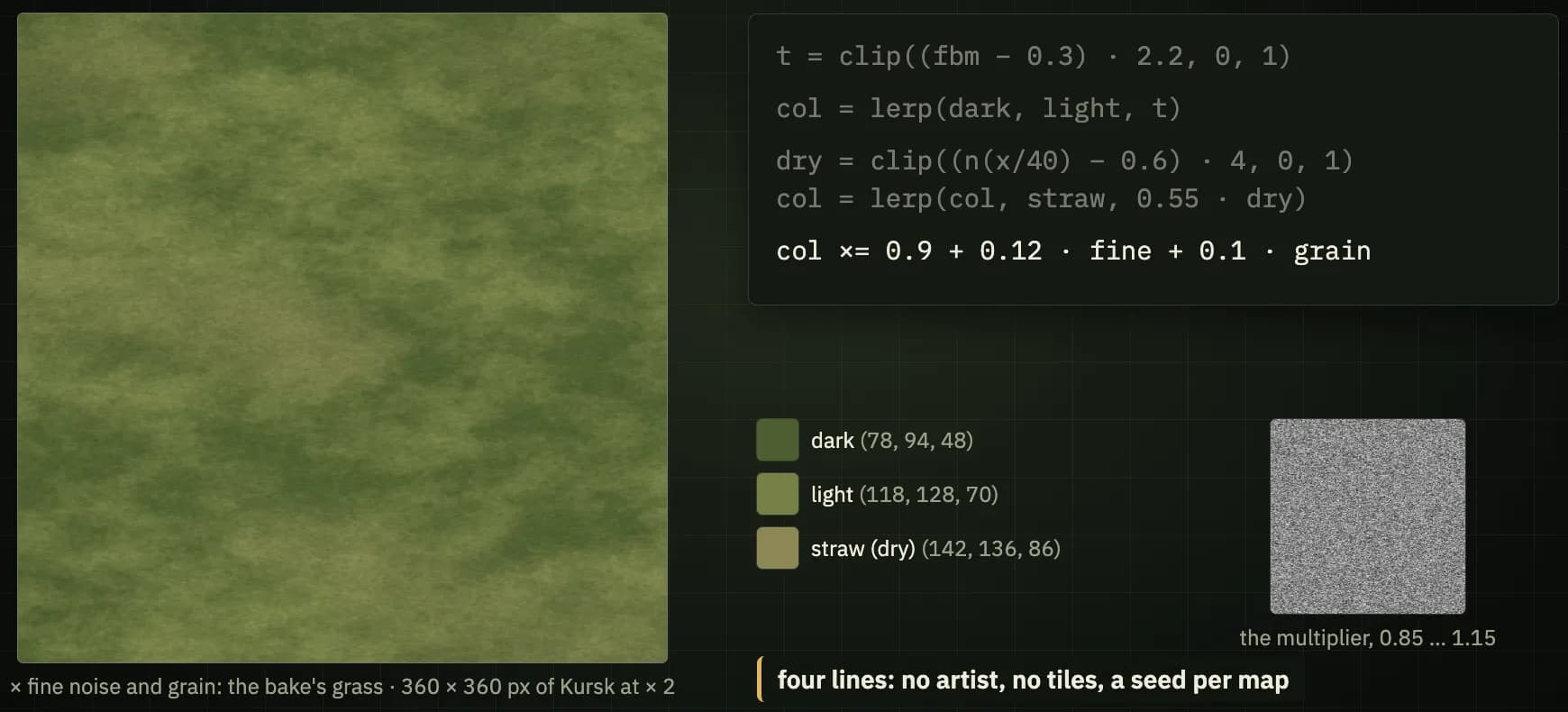
Here is grass, in four lines. Take the fractal sum, subtract 0.3, multiply by 2.2 and clamp between 0 and 1. That stretches the middle of a soft cloud into a contrast of patches: anything below 0.3 becomes fully dark, anything above about 0.75 fully light. Use the result, t, to blend between two greens: a dark one, (78, 94, 48), and a lighter one, (118, 128, 70).
Then the dry patches. Where the big slow noise, with a lattice of 40 units, rises above 0.6, the colour moves toward a dry straw, (142, 136, 86), up to 55 % of the way; the mask is full at 0.85. The meadow gets worn patches tens of units wide.
Last, every pixel is multiplied by a small factor: 0.9, plus 0.12 times the fine noise, plus 0.1 times the grain. That last term is what keeps a flat green from looking like paint. Four lines of arithmetic give a meadow that nobody has to draw, that never tiles, and that changes completely when the map's seed changes.
t = clip((fbm − 0.3) · 2.2, 0, 1)
col = lerp((78, 94, 48), (118, 128, 70), t)
dry = clip((n(x/40) − 0.6) · 4, 0, 1);   col = lerp(col, (142, 136, 86), 0.55 · dry)
col ×= 0.9 + 0.12 · fine + 0.1 · grain
fbm = 0.5:  t = (0.5 − 0.3) · 2.2 = 0.44  →  (95.6, 109.0, 57.7)
Edges that wobble
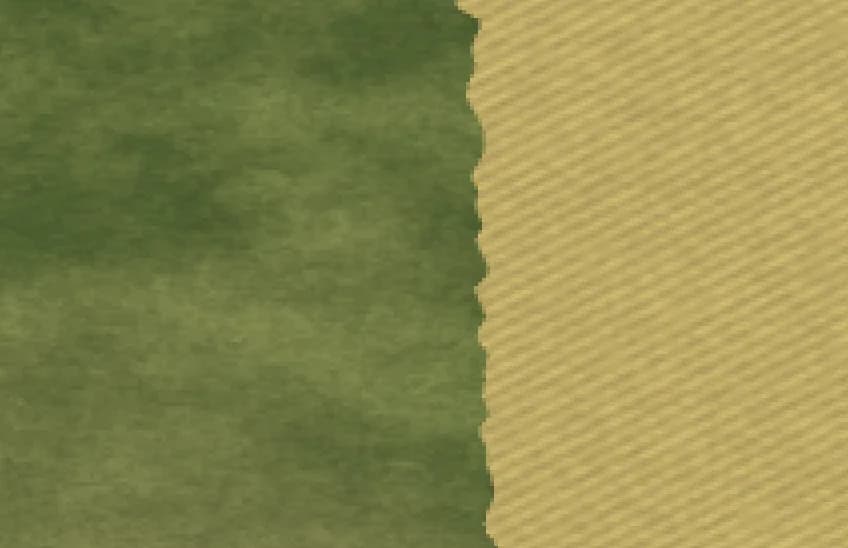
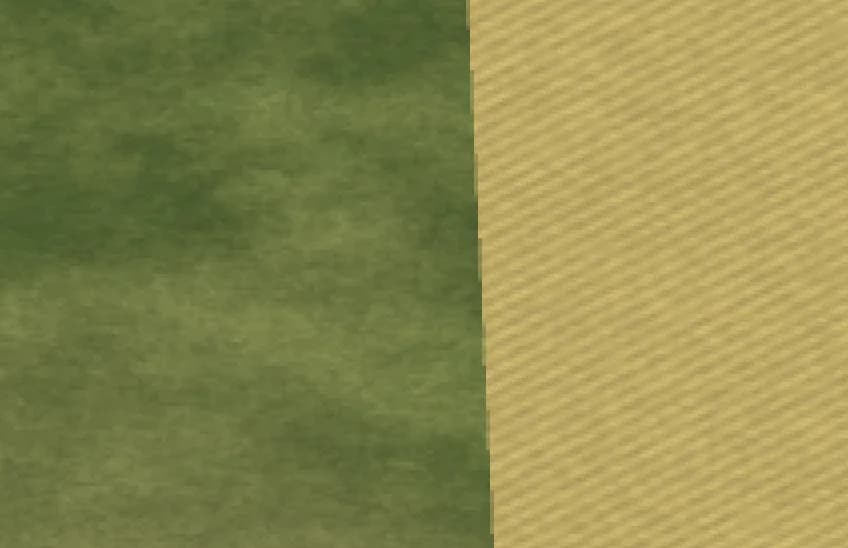
Fields, forests and villages are polygons drawn by the map author, and polygons have straight edges. Nature does not. The obvious fix, blurring the boundary, looks wrong: a soft field edge reads as a mistake, not as wheat. So the mask stays hard, 0 or 1, and the bake moves the point being tested instead.
Before asking whether a pixel is inside the wheat field, the bake shifts the question by the edge noise, value noise with a lattice of 3 units, scaled to run from −1 to +1 unit. Pixels near the boundary fall in or out of the field by that wobble, and the edge becomes ragged at the scale of a few blades, while every pixel is still either grass or wheat. Then the field's colour goes on with the usual mix: the colour times (1 − m), plus the field's colour times m.
One subtlety. The shift down the screen, along v, is twice the shift across, along u. In this projection the ground is squeezed to half its depth, sin 30° = 0.5 (lesson 1), so a wobble of one unit along v would be only half a wobble on screen. Doubling it makes the edge equally rough in every direction.
col = col · (1 − m) + rgb · m
edge = (n(x/3) − 0.5) · 2   ∈ [−1, +1]
inside = polygon(u − edge, v − 2·edge)
2 · edge · sin 30° = edge
Fields and roads
Inside a field the recipe changes, and each kind of field has a line or two of its own. A wheat field adds a sine wave along x with a period of 1.5 units, so the rows run the way the farmer drove; x and y are the ground's own axes, at 45° to the screen. A ploughed field is a sine along y with a period of 1.8 units, darker in the furrows. Stubble has fine rows and bare patches, hay has windrows, and a forest floor is the grass tinted 22 % toward a dark olive, (52, 64, 36).
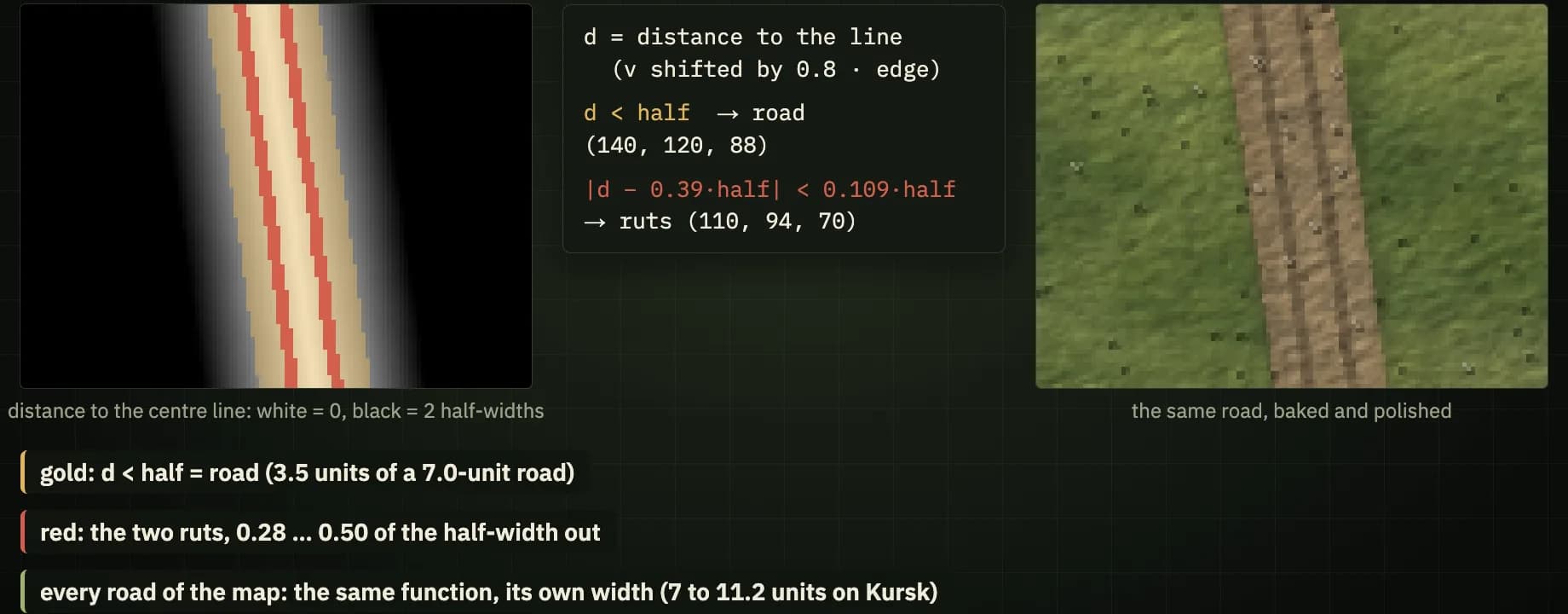
Roads are drawn by distance. For every pixel near a road the bake measures the distance d to the road's centre line, with v shifted by 0.8 times the edge noise so that roads wobble too. Closer than half the width, the pixel is road, a dusty brown, (140, 120, 88). On both sides, where d is within 0.109 half-widths of 0.39 half-widths, a narrow band is painted darker, (110, 94, 70): the ruts, where wheels have run for years. Each rut is about a fifth of the half-width wide.
On a road 7 units wide the half-width is 3.5 units, and the ruts run from 0.98 to 1.75 units out from the centre line on each side. Every road of the map, village lane, main road or forest track, comes from the same distance function with its own width: on Kursk from 7 to 11.2 units.
wheat = sin(2π·x / 1.5),   plough = sin(2π·y / 1.8)
forest = lerp(col, (52, 64, 36), 0.22)
d < half  →  (140, 120, 88)
|d − 0.39·half| < 0.109·half  →  (110, 94, 70)
half = 3.5:  0.281·3.5 … 0.499·3.5 = 0.98 … 1.75
Two samples per pixel, in bands
All of that arithmetic runs per sample, and a pixel has a problem: an edge that passes through its middle has to pick one side. One sample per pixel gives staircases along every field and road. So the bake renders the ground at twice the size in each direction, four samples for every final pixel, and averages them. That is supersampling. Edges become clean slopes instead of staircases, and the grain settles into something the eye reads as texture rather than static.
For Kursk that is 13,440 × 5760 samples, 77.4 million, too many to hold at once. The work is done in horizontal bands of about 2 million samples, which is 256 rows of the small 1920-pixel farm map and 73 rows of Kursk, and the finished ground is saved one row of chunks at a time. A map of 20 million pixels never has to be in memory at full size.
And every part of it is deterministic. The seeds come from the map, the hash has no randomness in it, and a second bake produces the same bytes. That is how a change to the recipe is checked: rebuild the maps it should not touch, and not one byte may move.
SS = 2  →  2 × 2 = 4 / px
(6720 · 2) × (2880 · 2) = 13440 × 5760 = 77.4 M
band ≈ 2 M = 256 · 1920 · 4 ≈ 73 · 6720 · 4
The polish pass
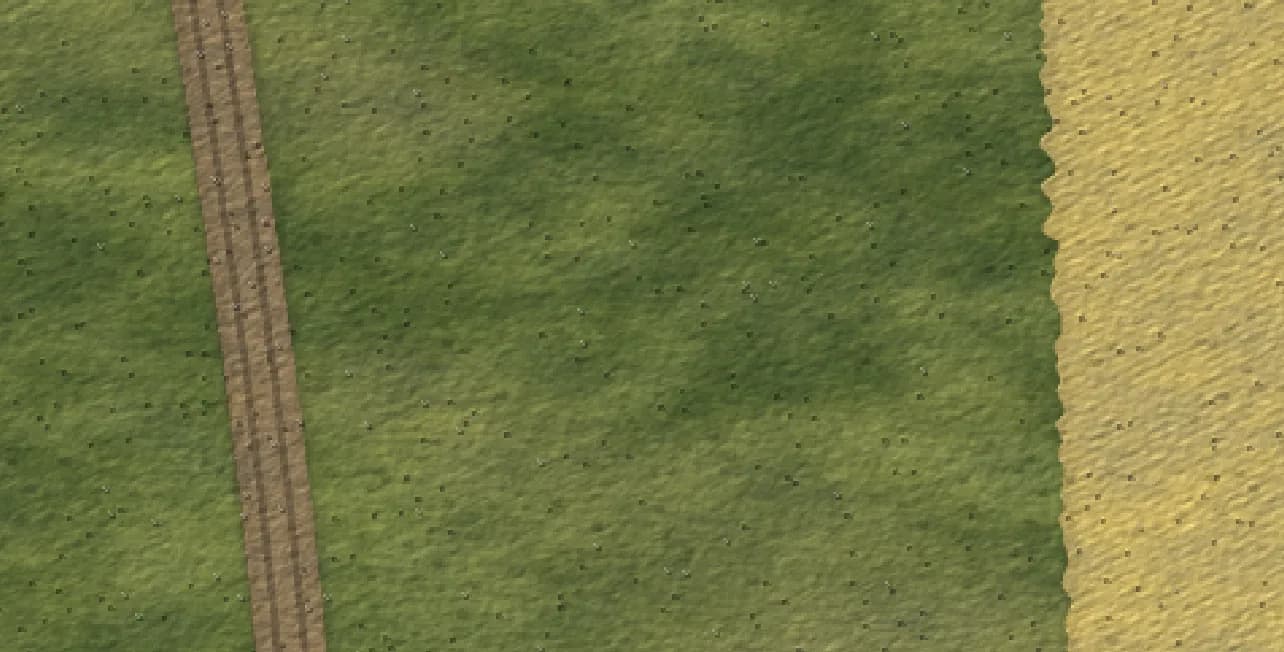
The recipe so far gives a correct ground. The polish pass makes it a painted one, and every step of it is a small multiplication. First, tonal drift: two very slow noises, at 260 and 90 units, brighten and darken the grass by ±5 %, a range of 10 %, so a wide meadow is not one even green. Then clumps, at 9 and 3.2 units, by ±3.5 %, a range of 7 %.
Then micro relief: a tiny height field for each kind of ground, lit from the north-west by subtracting half of its slope from the brightness, so the grass has a nap. Then stamps: tufts, stones, clods and puddles, scattered on a jittered grid of 6 pixels so that they never line up.
The boundaries get their own treatment. Along a road the outline is blurred by 2.2 pixels, and the grass under the blur is pulled toward bare soil, (70, 58, 40), by up to 28 %: a worn verge. Every change of ground kind gets a headland, 7 % darker within 3 pixels of the boundary, the trodden strip at the edge of every field. And under each house, tree and hedge the bake lays a contact shadow of 30, 22 and 20 %, so that objects sit on the ground instead of floating above it.
macro: n(x/260), n(x/90)  →  grass × (1 ± 0.05)
meso: n(x/9), n(x/3.2)  →  grass × (1 ± 0.035)
mult −= (gx + gy) · 0.5
verge: blur 2.2 px, ≤ 0.28 → (70, 58, 40)
headland: × 0.93 within 3 px
shadow: house 0.30,  tree 0.22,  hedge 0.20
Saving the picture
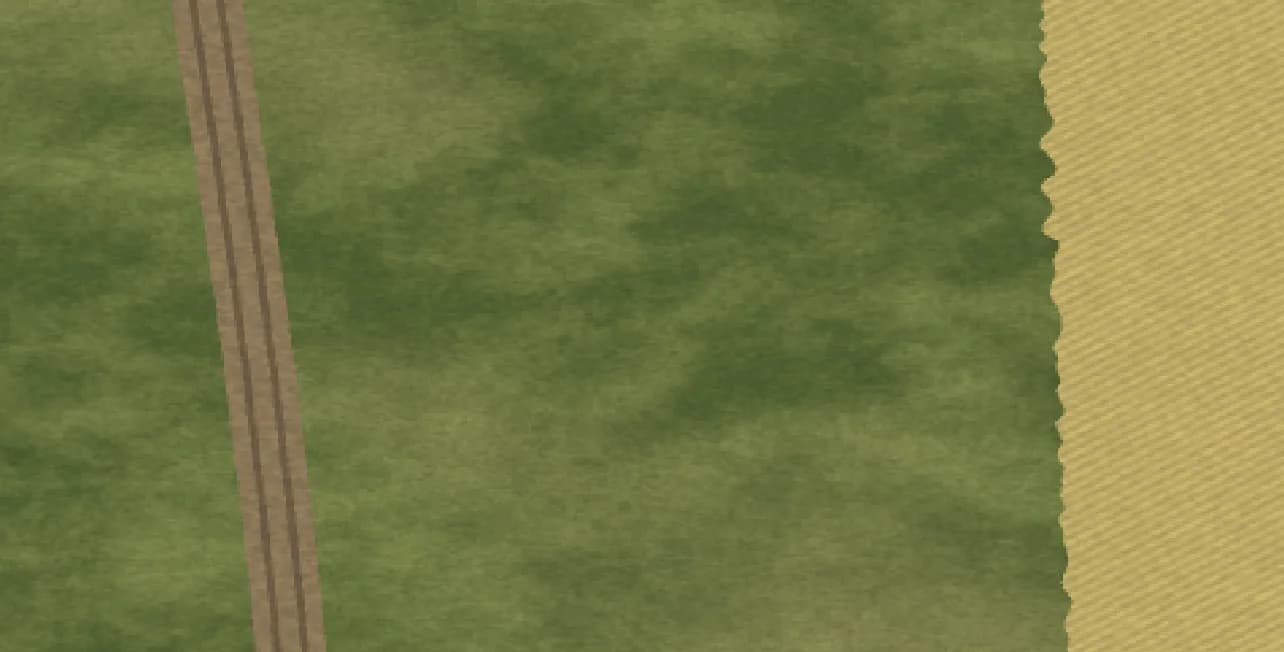
The finished chunks are saved as JPEG at quality 88, and for a map like this one setting matters more than the quality. JPEG stores brightness at full resolution and colour at a lower one, by default at half resolution in both directions: one colour sample for every 2 × 2 pixels, written 4:2:0. In a photograph nobody notices.
In a baked ground they do. The edge of a golden wheat field against green grass is exactly the kind of coloured detail that half-resolution colour smears, and at zoom 2 the smear becomes a 4-pixel halo on screen. So the polished maps are saved with colour at full resolution, 4:4:4.
The cost is smaller than you might expect. Kursk's chunks, re-encoded at quality 88, average 0.26 MB with 4:2:0 and 0.31 MB with 4:4:4, about a fifth more, because most of a JPEG is brightness detail anyway. The whole map is 21 chunks and 6.5 MB on disk for 77.4 MB of pixels, about 12 to 1. That ratio is why the ground can be a picture at all.
JPEG q = 88
4:2:0 → 1 chroma / 2 × 2 px;   4:4:4 → 4 / 2 × 2 px
2 px · zoom 2 = 4 px
0.31 MB / 0.26 MB = 1.19
77.4 MB / 6.5 MB ≈ 12


Winter and desert
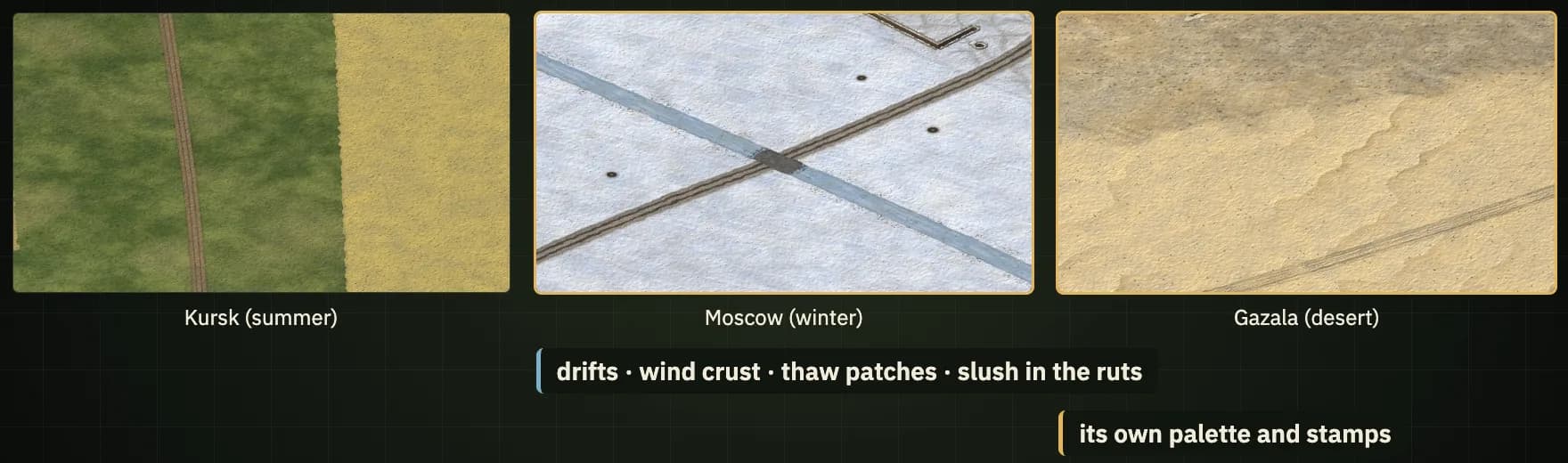
A winter map is not a summer map tinted white. It has its own recipe: snow drifts from a slow noise, a wind crust at a finer scale, thaw patches where frozen grass shows through, and slush in the ruts of the roads. A desert map has another palette and another set of stamps.
All of that happens at bake time, so a winter chunk is simply a different picture. At run time a season only chooses which pictures are loaded: the winter or desert versions of the sprites, whitewashed tanks instead of green ones, and the matching detail texture of the high-definition path. The ground never knows what season it is; it only knows what it was painted. The one exception is the subject of the next lesson: the marks that a battle leaves are painted at run time, and they are painted differently on snow.
What the renderer does with it
At run time the chunks are passive. The renderer uploads only the chunks that touch the view, and it does so carefully, because uploading a 1024 × 1024 texture costs between 3 and 10 milliseconds, most of a 16.7 ms frame. After its first upload a chunk goes up again only when its canvas changes, for example when the battle paints into it.
In steady play a changed chunk is uploaded at most every fourth frame, in turn, and the rest wait. Logged from the game at 30 frames a second, that comes to 7 or 8 uploads a second. Only a seek, a rewind or a load uploads every chunk in view at once, because then a stall is expected.
How a chunk is sampled depends on the sprite set. With standard sprites the ground uses nearest sampling, so at zoom 2 every ground pixel is a crisp block of 4 screen pixels, matching the sprites. With high-definition sprites it switches to linear, because the ground was baked at the standard density and would otherwise look coarser than the tanks on it. Lesson 3 is about that choice.
upload 1024²: 3–10 ms of 16.7 ms
≤ 1 upload / 4 frames  →  30 / 4 = 7.5 / s
SD: nearest,   HD: linear
Detail where the eye is
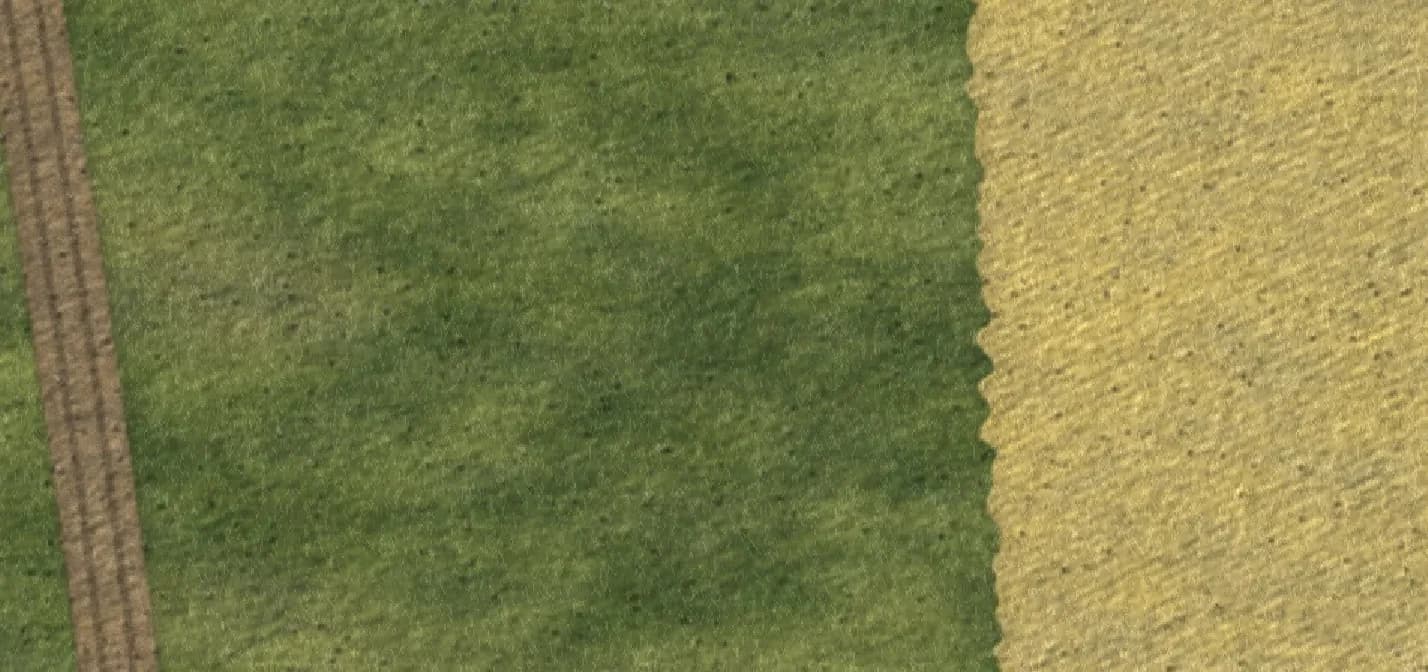
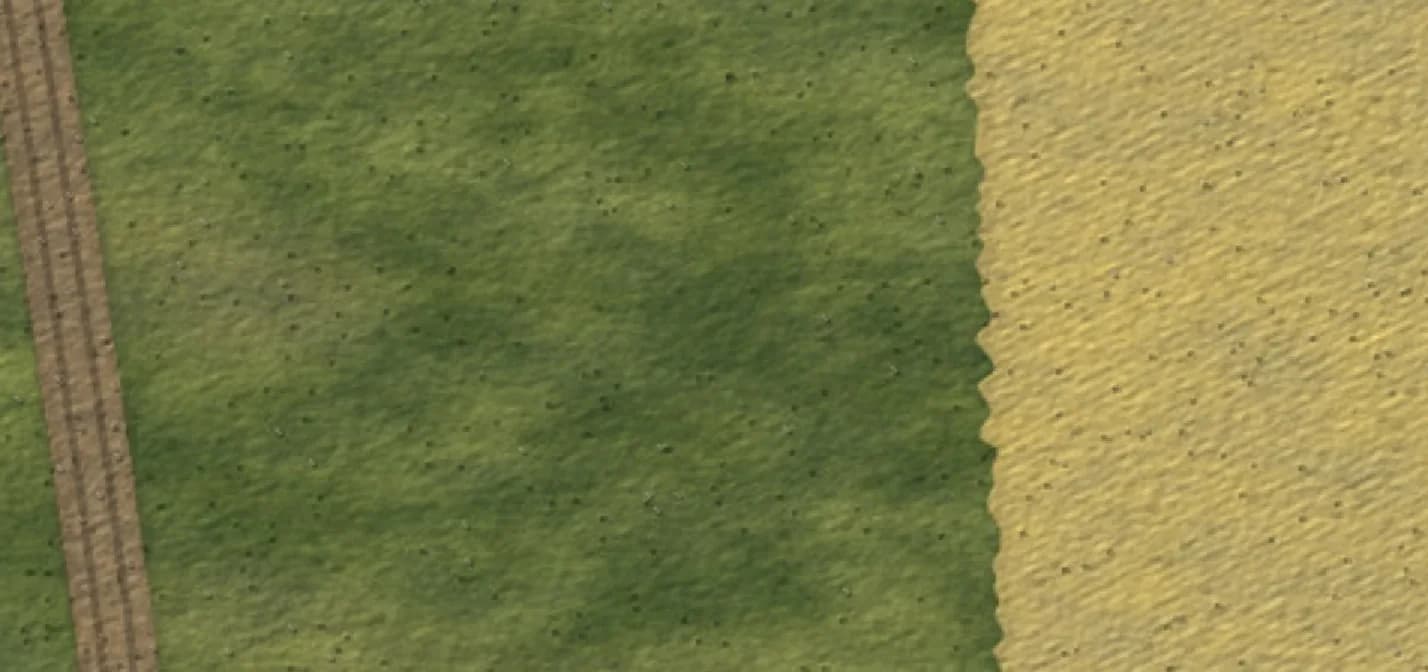
At zoom 2 one baked pixel covers 4 screen pixels, and next to high-definition sprites that shows. So the high-definition path adds detail at run time, in a shader, and only when the camera is zoomed in. It draws the whole map twice more as two flat quads, one blended in multiply mode, which can only darken, and one in add mode, which can only lighten. It needs WebGL 2 and the HD sprite set; without them the ground is the baked picture alone.
Both quads read a small detail texture, 256 × 256 pixels, that repeats every 128 pixels of the map. To hide the repetition they read it a second time, stretched to 2.3 times the size and shifted, and mix 40 % of that in. The texture has three channels, one kind of detail each: grass, soil, and snow or sand. Which channel applies where comes from a tiny weights texture baked with the map, one pixel for every 4 × 4 map pixels: red for grass and dry grass, green for plough, mud and road, blue for snow, ice and sand. For Kursk it is 1680 × 720 pixels and 22 KB.
The shader weights the detail by those channels, centres the result around zero and splits it. The negative half darkens in the multiply pass by up to 45 %; the positive half adds light in the add pass, up to 30 % of full white, slightly warm. A gain g ramps the whole effect in with a smoothstep, from nothing at zoom 1.1 to full at zoom 2. At zoom 1.7 the gain is 0.74, and at zoom 1 the ground is exactly the baked picture.
p = map px / 128
d = mix(tex(p), tex(p · 0.43 + (0.37, 0.61)), 0.4);   1 / 0.43 ≈ 2.3
a = (dot(d, w) / Σw − 0.5) · 2
multiply: 1 − max(−a, 0) · g · 0.45;   add: max(a, 0) · g · 0.3 · (1, 0.98, 0.9)
g = smoothstep(1.1, 2, zoom);   zoom 1.7: t = 0.6 / 0.9 = 0.67,  g = 3t² − 2t³ = 0.74
w: 6720 / 4 × 2880 / 4 = 1680 × 720
The minimap
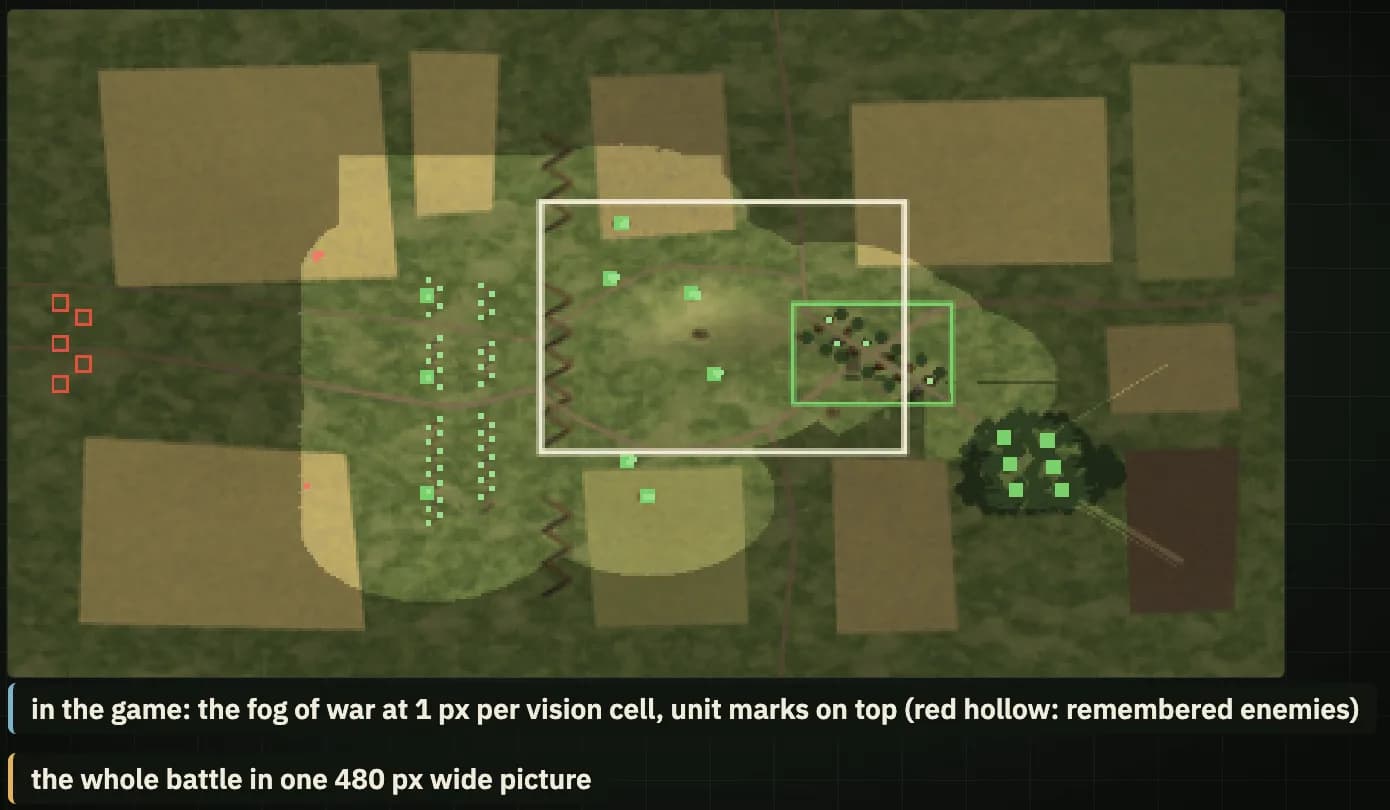
The last picture the bake makes is the smallest. Every band of the ground is scaled down to 480 pixels wide with a Lanczos filter, which keeps roads and field edges readable at a reduction of 14 to 1. Then the bake draws what the ground alone would not show: each tree as a 4 × 3 pixel ellipse, each house as its polygon, each fence as a stroke.
The Kursk minimap is 480 × 206 pixels and 155 KB. In the game the fog of war is drawn over it at one pixel per vision cell, and the unit marks on top of that. A player reads the whole battle from a 480-pixel picture, baked from the same recipe as the ground under the tanks.
6720 / 480 = 14;   2880 / 14 ≈ 206
Kursk: 480 × 206 px, 155 KB
Noise in games, briefly
Painting with noise dates from 1985, when Ken Perlin published a function that gave every point in space a smooth random value. He had worked on the film Tron (1982) and wanted computer pictures to look less machine-made, and the noise won him an Academy Award for Technical Achievement in 1997. Perlin's noise stores a gradient at each lattice point. Value noise, the kind used here, stores a plain value, which is cheaper and good enough for grass. Summing octaves with falling weights is older still, from the mathematics of rough surfaces and Mandelbrot's work on fractals.
Games of the 1990s mostly tiled their ground from small pictures, and everyone learned to see the seams. The 2000s painted backgrounds by hand, beautiful and expensive. This bake is a third way: a painted ground, with the painter replaced by arithmetic and the arithmetic seeded by the map.
What it costs
What does a painted ground cost? On disk, very little: Kursk is 6.5 MB. In memory, 77.4 MB per copy, and there are two copies, the canvas and the texture. In time, almost nothing per frame: the chunks are drawn as ordinary textures, and uploads are spread out.
The one expensive moment is a seek, when every chunk in view uploads at once and the game accepts a long frame. The real cost is the bake itself: minutes of arithmetic per map on a workstation, within a budget of 25 minutes, paid once, before anyone plays.
That is the bargain of a baked ground. Everything that can be decided before the battle is decided before the battle, and the renderer is left with a picture. Except for the marks the battle itself leaves: that is the next lesson.
6.5 MB on disk; 2 × 77.4 MB = 154.8 MB in memory
| Kursk, 6720 × 2880 | Cost |
|---|---|
| On disk, 21 JPEG chunks | 6.5 MB |
| Canvases on the CPU (RGBA) | 77.4 MB |
| Textures on the GPU (RGBA) | 77.4 MB |
| Every frame | chunks drawn as textures, at most one upload every 4th frame |
| A seek | every chunk in view at once, 3–10 ms each |
| The bake | minutes per map, once, before anyone plays (budget 25 min) |