
The Camera That Never Moves: Projection Math of a 2D Isometric Game
Iron Sector has no 3D camera at run time, only the fixed one that every sprite was rendered from. This lesson follows a point from the ground to a pixel and back to a click, with every formula worked through in the game's real numbers.
- camera yaw and elevation, fixed forever
- 45° / 30°camera yaw and elevation, fixed forever
- every ground diamond, width to height
- 2 : 1every ground diamond, width to height
- per unit of ground, across the screen
- 3.75 pxper unit of ground, across the screen
- multiplications to project a point
- 3multiplications to project a point
A picture, not a world
Iron Sector is a 2D game. At run time there is no 3D scene, no camera matrix, no perspective divide. Every tank, gun and soldier is a picture, rendered once from 3D models from a fixed camera and stored in an atlas.
That has a price: the camera can never move again. Change its angle by one degree and every sprite, every house and every baked map has to be rendered again. So the two angles of that camera are the most important numbers in the project, and everything else follows from them: the ground diamond, height, zoom and the way a click finds a tank.
Two angles
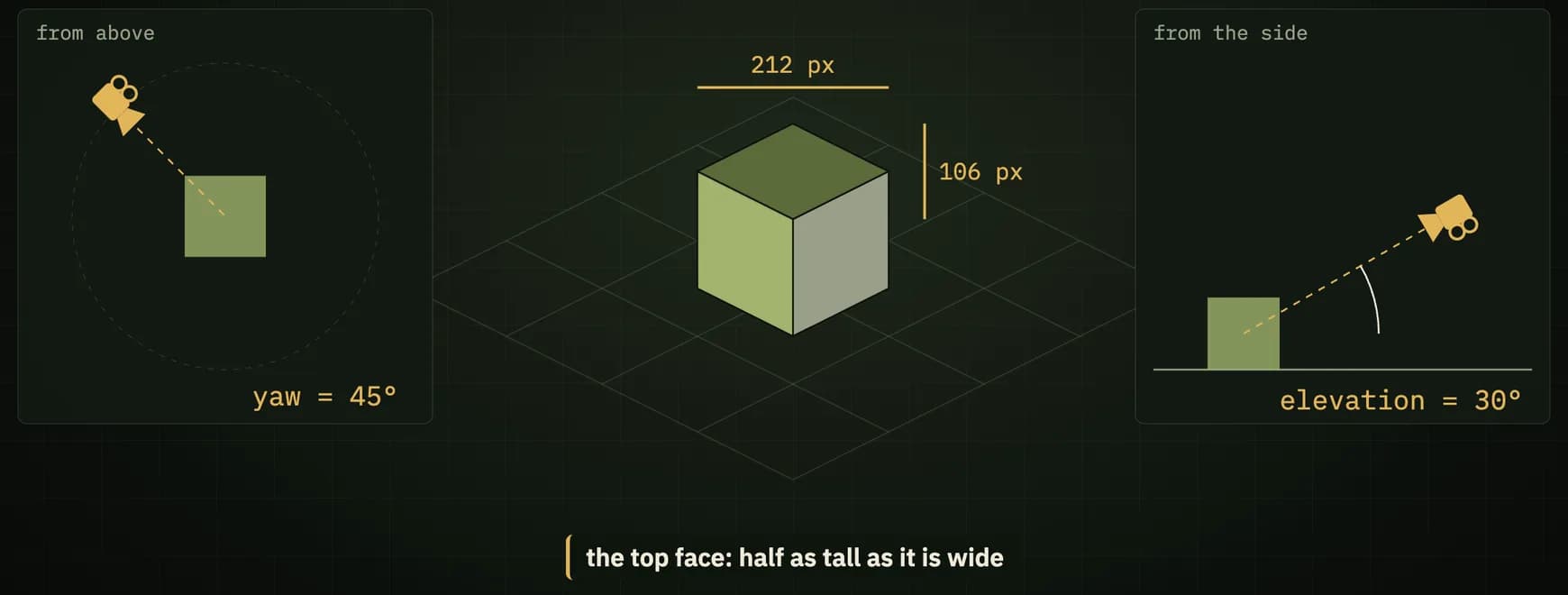
The first angle is the yaw. The camera is turned 45° around the vertical axis, so it looks at every box from a corner: two side walls are visible, both the same size. That is why a tank in this game is never seen straight from the side.
The second is the elevation. The camera looks down from 30° above the horizon. The top of every object is visible, but squashed: the top face of a cube is exactly half as tall on screen as it is wide. These two numbers, 45 and 30, decide the shape of every pixel the game will ever draw, and neither may ever change.
Isometric is the wrong word
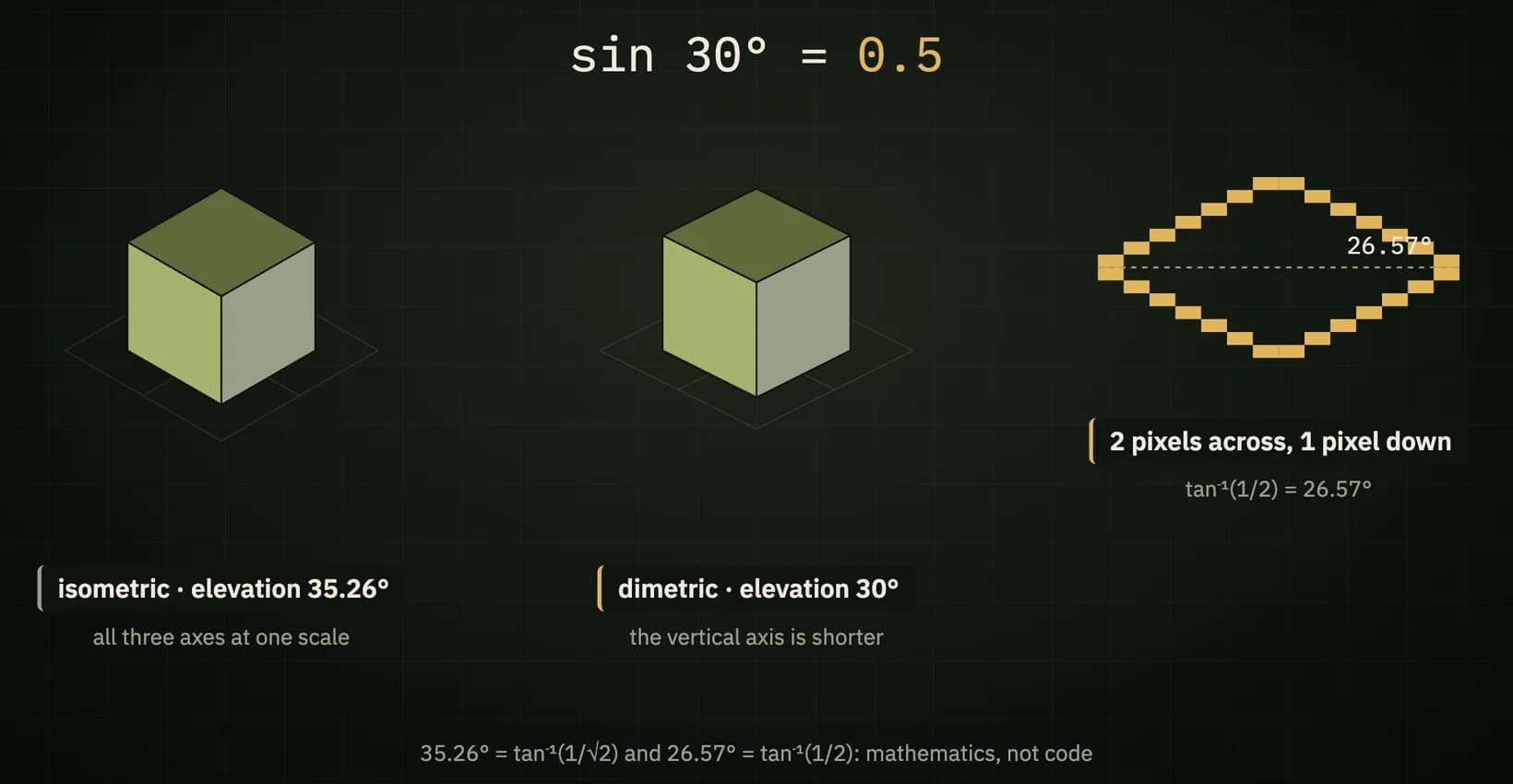
Everybody calls this kind of game isometric. Strictly, it is not. In a true isometric view the camera is tilted 35.26° and all three axes are drawn at the same scale. The edges of the ground diamond then run at 30° to the horizontal, and that angle does not fit a pixel grid: the edge steps irregularly.
So pixel games lower the camera slightly, to 30°. The ground diamond becomes exactly twice as wide as it is tall, and its edge runs 2 pixels across for every 1 pixel down: a clean staircase at 26.57°. The correct name for this projection is dimetric, because two axes share a scale and the third, the vertical, is shorter. The name matters less than the number: the sine of 30° is one half, and that half turns up in every formula from here on.
35.26° = tan⁻¹(1/√2)
sin 30° = 0.5
26.57° = tan⁻¹(1/2)
The diamond and the ellipse
Call that half SE, for the sine of the elevation. It is the depth squeeze: anything flat on the ground keeps its full width on screen and loses half of its depth. A circle becomes an ellipse twice as wide as it is tall, and a square lying along the world axes becomes the diamond.
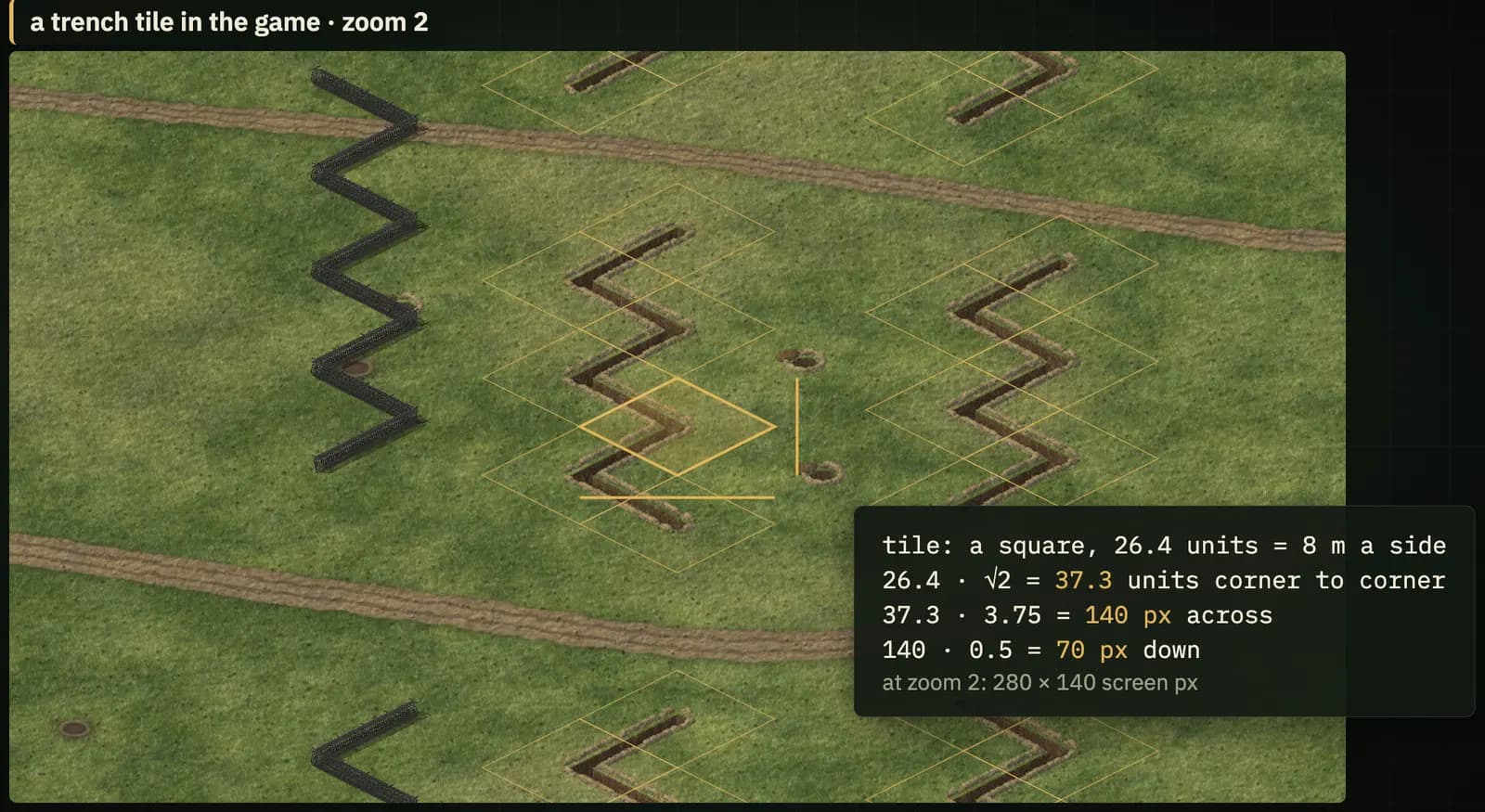
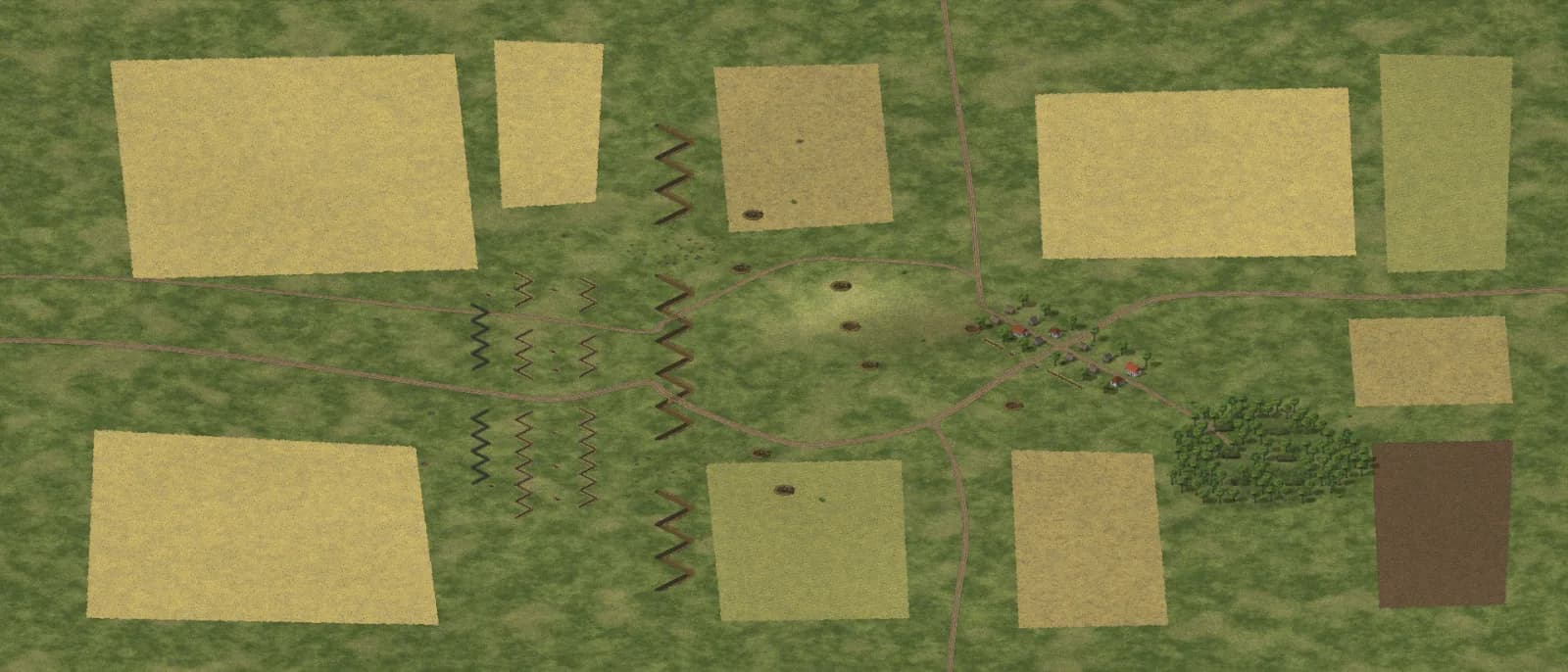
The game has one more constant, the scale PPU, pixels per unit: one unit of the model is 3.75 pixels across the screen. Take a trench tile: a square 8 metres, or 26.4 units, on a side, laid along the world axes. The camera turns it by 45°, so its far corners are 26.4 × √2 = 37.3 units apart. Across the screen that is 37.3 × 3.75 = 140 pixels; down the screen, half of that, 70 pixels. Measure a trench diamond in the game and that is exactly what you get.
SE = sin 30° = 0.5,   PPU = 3.75
r  →  r · PPU  ×  r · PPU · SE
26.4 · √2 = 37.3
37.3 · 3.75 = 140 px,   140 · 0.5 = 70 px
Three coordinate systems
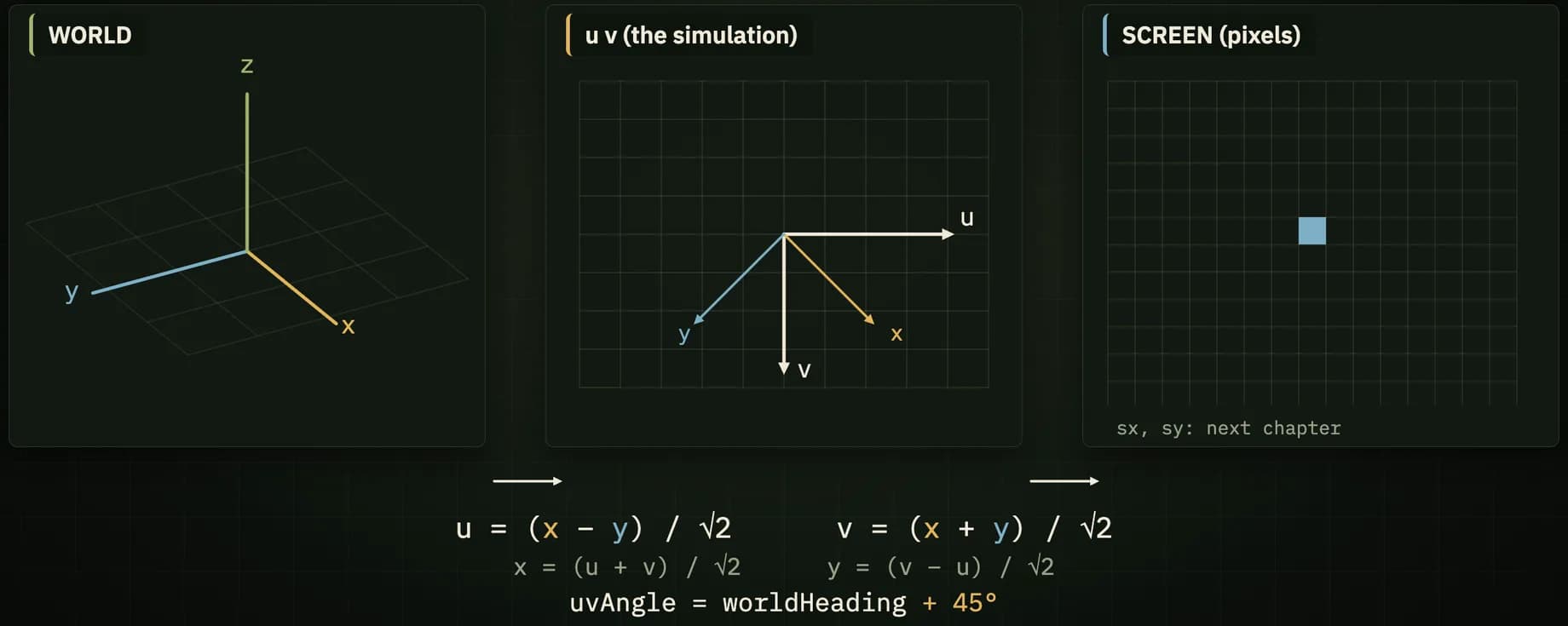
The game keeps three coordinate systems. The first is the world of the models: x forward, y to the right, z up, with a heading of 0 pointing along x.
The second is the ground plane as the screen sees it, called u v: u runs to the right of the screen and v runs down it. It is the world's ground turned by the camera's 45° with no change of scale: one unit in u v is one unit in the world. Converting is a single rotation, and a heading in u v is the world heading plus 45°.
Units move, shells fly and distances are measured in u v. The third system is the screen, in pixels, and the next formula takes us there.
u = (x − y) / √2      v = (x + y) / √2
x = (u + v) / √2      y = (v − u) / √2
uvAngle = worldHeading + 45°
worldHeading = 0°  →  uvAngle = 45°
From the ground to a pixel
Here is the whole projection. The screen x is the centre of the map plus u times PPU. The screen y is the centre plus v times PPU times SE, minus a height term we will open next. No matrices: three multiplications and a few additions.
One unit along u is 3.75 pixels across the screen, one unit along v is 1.875 pixels down it. A metre is 3.3 units: about 12 pixels along u, 6 along v.
Place a tank 100 units right of the map centre and 40 units towards the camera: its screen x is the centre plus 100 × 3.75 = 375 pixels, its screen y the centre plus 40 × 1.875 = 75 pixels.
The same arithmetic sizes a map. The Kursk map spans 1,792 by 1,536 units; multiply the width by 3.75 and the depth by 1.875 and it becomes a picture of 6,720 by 2,880 pixels. That is why a map that is almost square on the ground (1.17 : 1) is a wide panorama on the screen (2.33 : 1).
sx = W/2 + u · PPU
sy = H/2 + v · PPU · SE − z · CE · PPU
PPU = 3.75,   SE = 0.5,   CE = cos 30° = 0.866
u = 100, v = 40, z = 0  →  sx = W/2 + 375,   sy = H/2 + 75
Kursk: 1792 · 3.75 = 6720 px,   1536 · 1.875 = 2880 px
Height
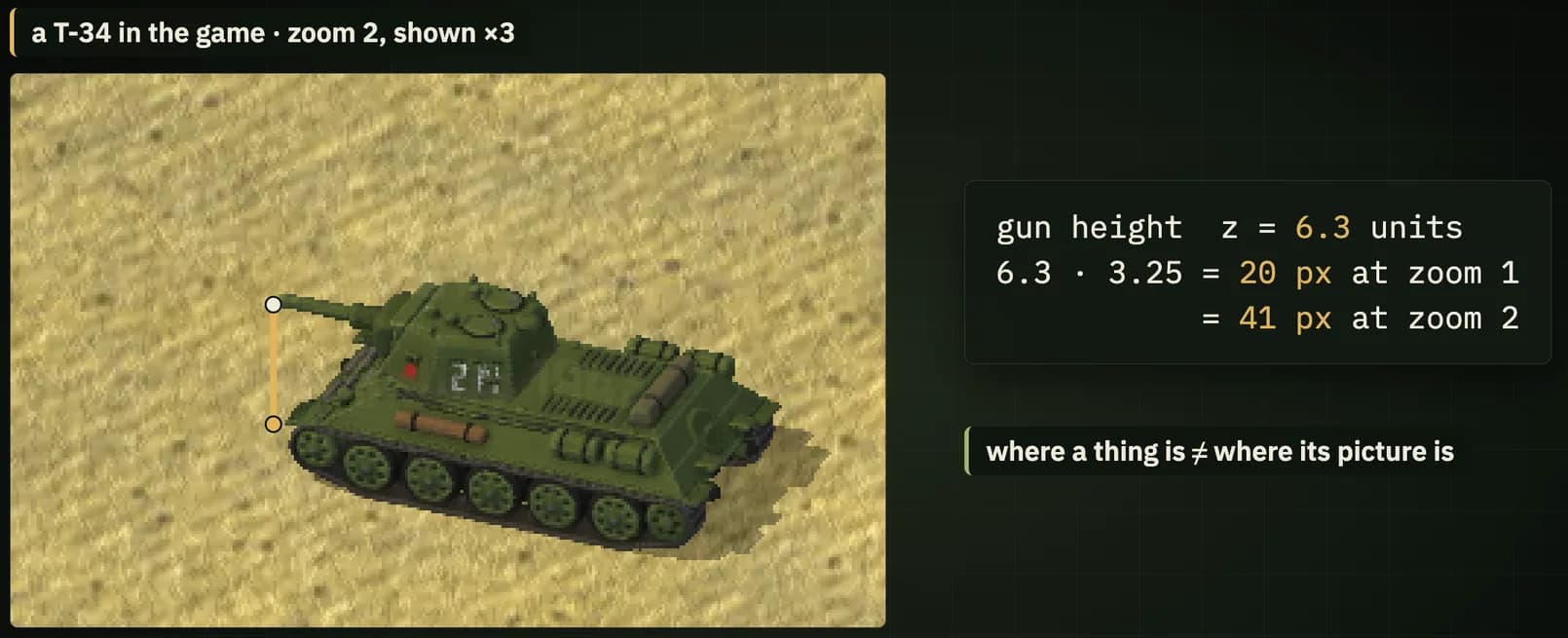
A vertical line is shortened too, but less than depth is. A vertical length is multiplied by the cosine of 30°, 0.866, while depth is multiplied by the sine, one half. Call the cosine CE. A thing at height z is drawn higher on the screen by z × CE × PPU: about 3.25 pixels per unit, or 10.7 pixels per metre.
It does not move the object's ground point: the object is sorted and picked where it stands, and only its picture is lifted. The gun of a T-34 sits 6.3 units above the ground, so its muzzle is drawn about 20 pixels above the ground under it, 41 at zoom 2, yet the tank still belongs to the ground cell under its hull.
Keeping those two ideas apart, where a thing is and where its picture is, is the rule that makes depth sorting and terrain relief possible; both get lessons of their own.
CE = cos 30° = 0.866
lift = z · CE · PPU = z · 3.25 px
T-34: 6.3 · 3.25 = 20.5 ≈ 20 px;   · 2 = 41 px
| Direction | Per unit | Per metre |
|---|---|---|
| Along u, across the screen | 3.75 px | 12.4 px |
| Along v, down the screen | 1.875 px | 6.2 px |
| Height z, up the screen | 3.25 px | 10.7 px |
A short history of the diamond
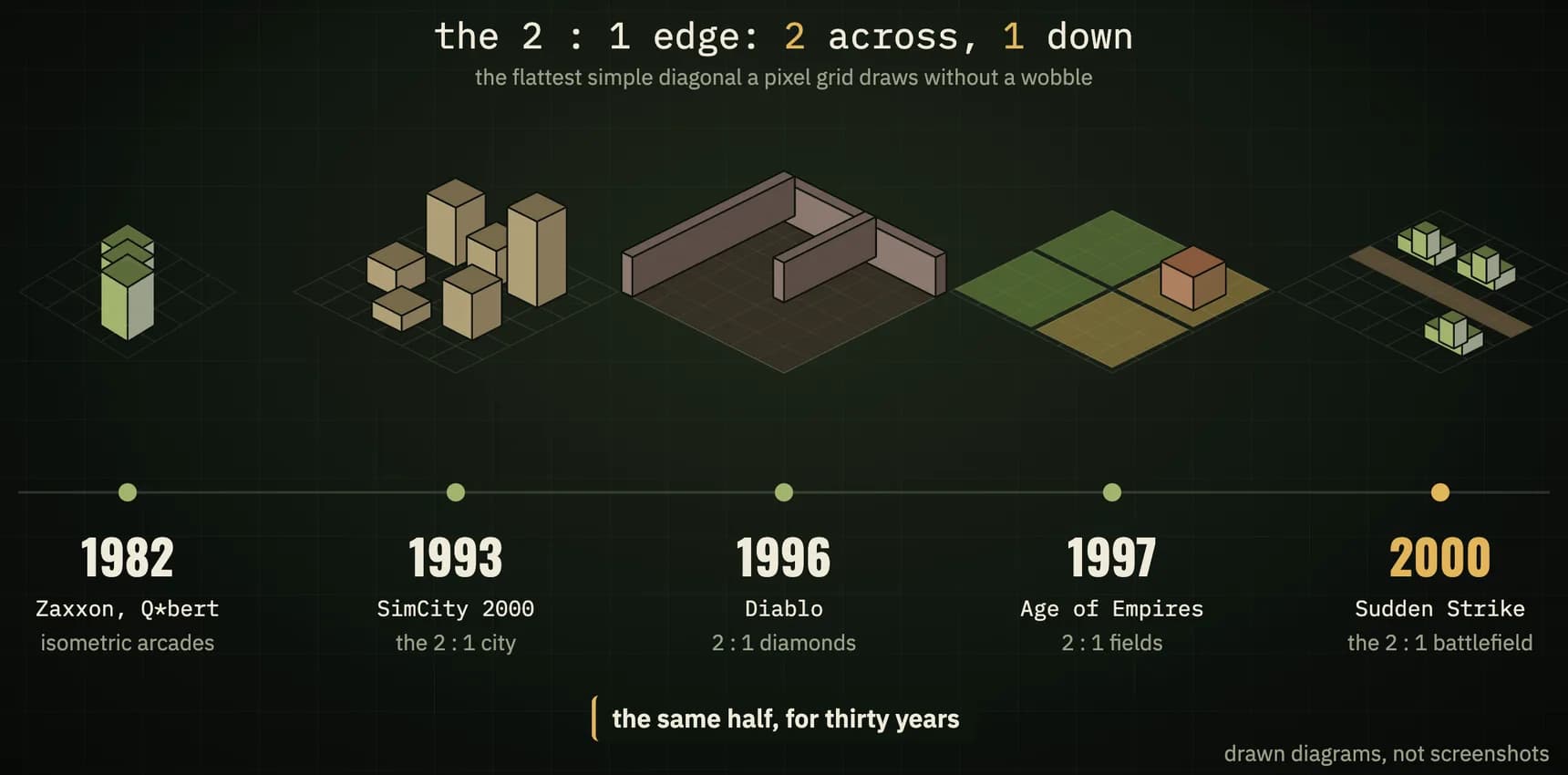
This diamond is older than most of the people who draw it. In 1982 arcade games such as Zaxxon and Q*bert showed the world from a three-quarter view on a pixel screen. In 1993 SimCity 2000 built a city from 2 : 1 blocks; Diablo drew its dungeons on the same diamond in 1996, Age of Empires its fields in 1997, and the war games of the 2000s, Sudden Strike among them, their battlefields of tanks and trenches.
From 1993 on, the games that tiled their maps chose the 2 : 1 diamond over the true isometric angle, for the same reason we did: it is the flattest simple diagonal a pixel grid draws without a wobble. Like many of those games, Iron Sector renders its sprites once from 3D models with that exact camera, so the pictures and the formulas agree to the pixel.
Where a scenario lives
Designers write neither pixels nor u v. A mission is authored in a normalised square from 0 to 100, with the origin in the north-west corner, x to the east, y to the south and rotation 0 pointing north. It knows nothing about the camera.
One function converts it: divide the normalised x by 100, subtract one half and multiply by the map's extent in units; the same for y. The rotation becomes a u v heading by subtracting 90°, because u v counts from screen right and the scenario from north. There is exactly one such function in the game, and nothing else may do that arithmetic: if the conversion lived in five places, five bugs would wait there.
Every scenario distance, a radius or a spacing, is a percentage of the map width, so a design moves to a bigger map without being rewritten.
u = (nx/100 − 0.5) · extent_u
v = (ny/100 − 0.5) · extent_v
uvHeading = rotation − 90°
1792 × 1536: (nx, ny) = (25, 50)  →  u = −448, v = 0
2688 × 2640: (nx, ny) = (25, 50)  →  u = −672, v = 0
rotation = 90°  →  uvHeading = 0°
Zoom
Zoom is three fixed steps: one half, one and two. Two are whole numbers on purpose: in the standard sprite set, at zoom 1 one texel lands on exactly one screen pixel, and at zoom 2 it covers a 2 × 2 block. Only the overview at one half resamples. The high-definition set has twice the texels; the third lesson is about what that costs.
Zooming happens around the cursor. First find the map point under it: the camera centre plus the cursor's offset from the middle of the view, divided by the old zoom. Then pick the new centre so the same point stays under the cursor: that point minus the same offset divided by the new zoom.
One detail matters more than it looks: every frame, the position of the world layer is rounded to a whole pixel. Without that, a slow pan would let sprites land between pixels and shimmer; with it, the picture moves in steps of exactly one pixel.
z ∈ {0.5, 1, 2}
m  = c + (s − view/2) / z₀
c′ = m − (s − view/2) / z₁
s = view/2  →  m = c,   c′ = c
position = round(view/2 − c · z)From a click to a tank
A click is the projection run backwards. First undo the camera's shift and zoom to get a point on the map picture. Then subtract the map centre, divide x by PPU and y by PPU × SE, and you have the ground point.
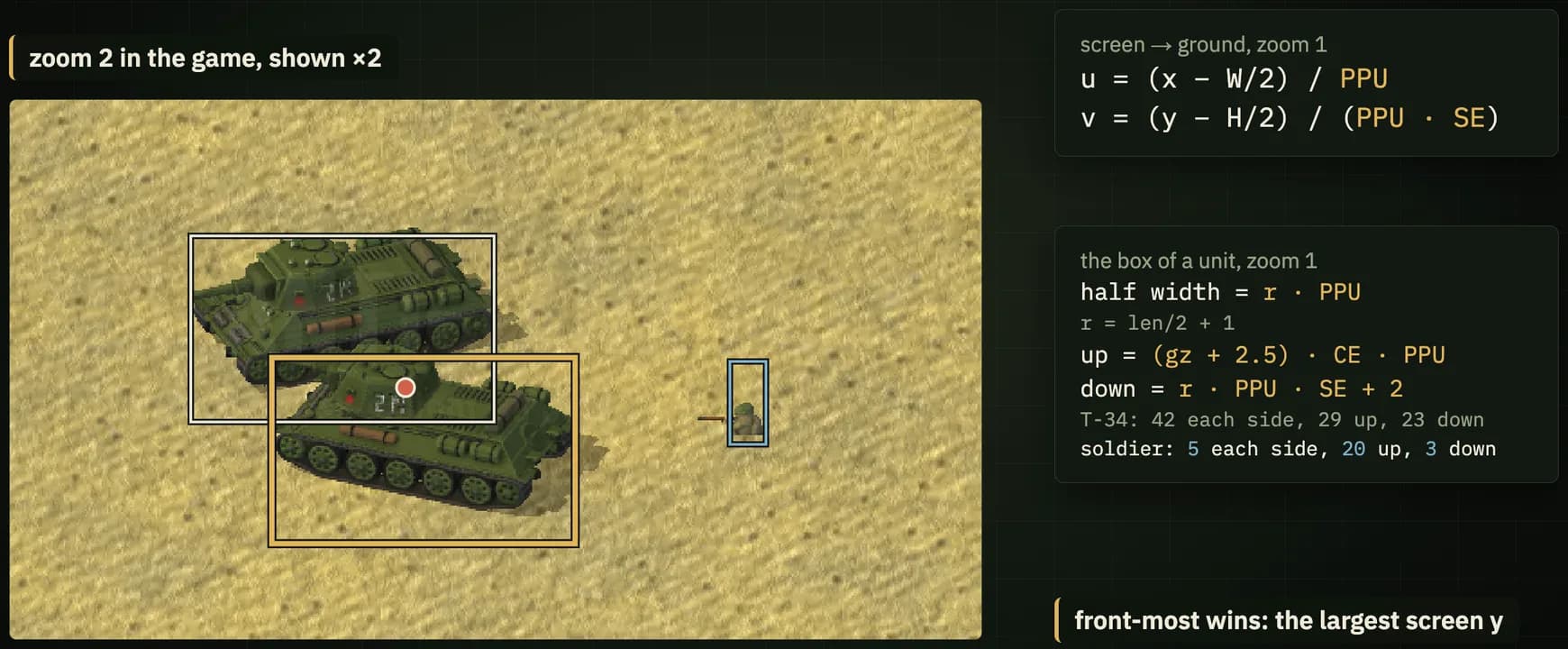
Finding a unit is a second step, because a tank's picture is taller than its footprint. Each unit gets a box. Its half-width is the unit's radius times PPU, where the radius is half the hull length plus 1 unit. It reaches up by the gun's height plus a margin of 2.5 units, scaled by CE × PPU, so a tall turret is still clickable, and down by the radius times PPU × SE plus 2 pixels, the near edge of the footprint ellipse.
For a T-34 that comes to 42 pixels on each side, 29 up and 23 down. A soldier gets a fixed box: 5 pixels on each side, 20 up, 3 down. All these sizes are at zoom 1 and grow with the zoom.
When boxes overlap, the game picks the one with the largest screen y: nearest the camera, and so also drawn on top. The eye and the mouse agree.
mx = (x − layerX) / z,   my = (y − layerY) / z
u = (mx − W/2) / PPU,   v = (my − H/2) / (PPU · SE)
mx = W/2 + 375,  my = H/2 + 75  →  u = 100,  v = 40
r = len/2 + 1,   hw = r · PPU
up = (gz + 2.5) · CE · PPU,   down = r · PPU · SE + 2
T-34: len = 20.44, gz = 6.3  →  r = 11.22,  hw = 42,  up = 29,  down = 23 px
soldier: hw = 5,  up = 20,  down = 3 px
Scroll, clamp and shake
Three small behaviours finish the camera. Edge scrolling starts when the cursor is within 12 pixels of the window's edge; at the default speed the view moves 900 screen pixels per second at any zoom, because the pan is divided by the zoom.
The clamp keeps the view inside the map: the centre may not come closer to an edge than half of the view divided by the zoom. If the map is narrower than the view, it is simply centred.
And the shake. When a shell explodes or a vehicle is destroyed near the view, a shake amount is set, scaled by how close it was to the middle of the screen. The camera is offset by a sine wave on one axis and a cosine on the other, with different frequencies, so it never wobbles in a straight line. The phase is the simulation frame, 30 per second.
Each step the amount is multiplied by 0.86: after half a second a tenth is left, after a second about one per cent. Both waves are divided by the zoom, so the shake is the same in screen pixels at every zoom. Small things, but a camera is made of small things.
c ∈ [view/2/z,  map − view/2/z]
bump = s · (1 − d / reach)
cx += sin(1.7 f) · s / z,   cy += cos(2.3 f) · 0.6 s / z
s ← 0.86 · s
0.86^15 = 0.10 (0.5 s),   0.86^30 = 0.011 (1 s)
What the fixed camera buys
At run time all this costs almost nothing. Projecting a point is three multiplications and a few additions. Houses, trees and other static things are placed once, when the map loads; each frame only the units and effects in view are projected again. A busy frame, thousands of static objects and hundreds of moving ones, takes about four draw calls, because every picture is already the right shape and shares a few texture pages with the rest.
What the fixed camera buys is exactness. Every sprite was rendered under this camera, so a tank's shadow, its turret ring and its tracks all fall onto the ground diamond without any correction at run time.
What it forbids is the one thing a 3D game takes for granted: you cannot rotate the view or tilt it. Every asset, hundreds of sprite sheets and 16 maps, depends on 45 and 30; change them and everything is rendered again. That is the bargain of a 2D game, and the rest of the course is about living inside it, starting with how tens of thousands of these pictures are packed into a few hundred texture pages.